OPC UA client
The OPC UA client driver reads and writes values of OPC UA servers: PLCs with an OPC UA server, gateways, other SCADA and MES systems. For what all drivers have in common, see How drivers work.
Protocol and role
| Role | Client. YTCC connects to the OPC UA servers. |
| Transport | OPC UA binary (opc.tcp://) |
| Default port | 4840 (part of the endpoint URL) |
| Devices per driver | Any number; each server has its own session and subscription. |
| Driver type | OPC UA (opc_ua) |
Device parameters
Set these on the device in Drivers → devices (see Add drivers and devices). An empty box uses the default shown in it. The help mark next to each parameter shows a short description.
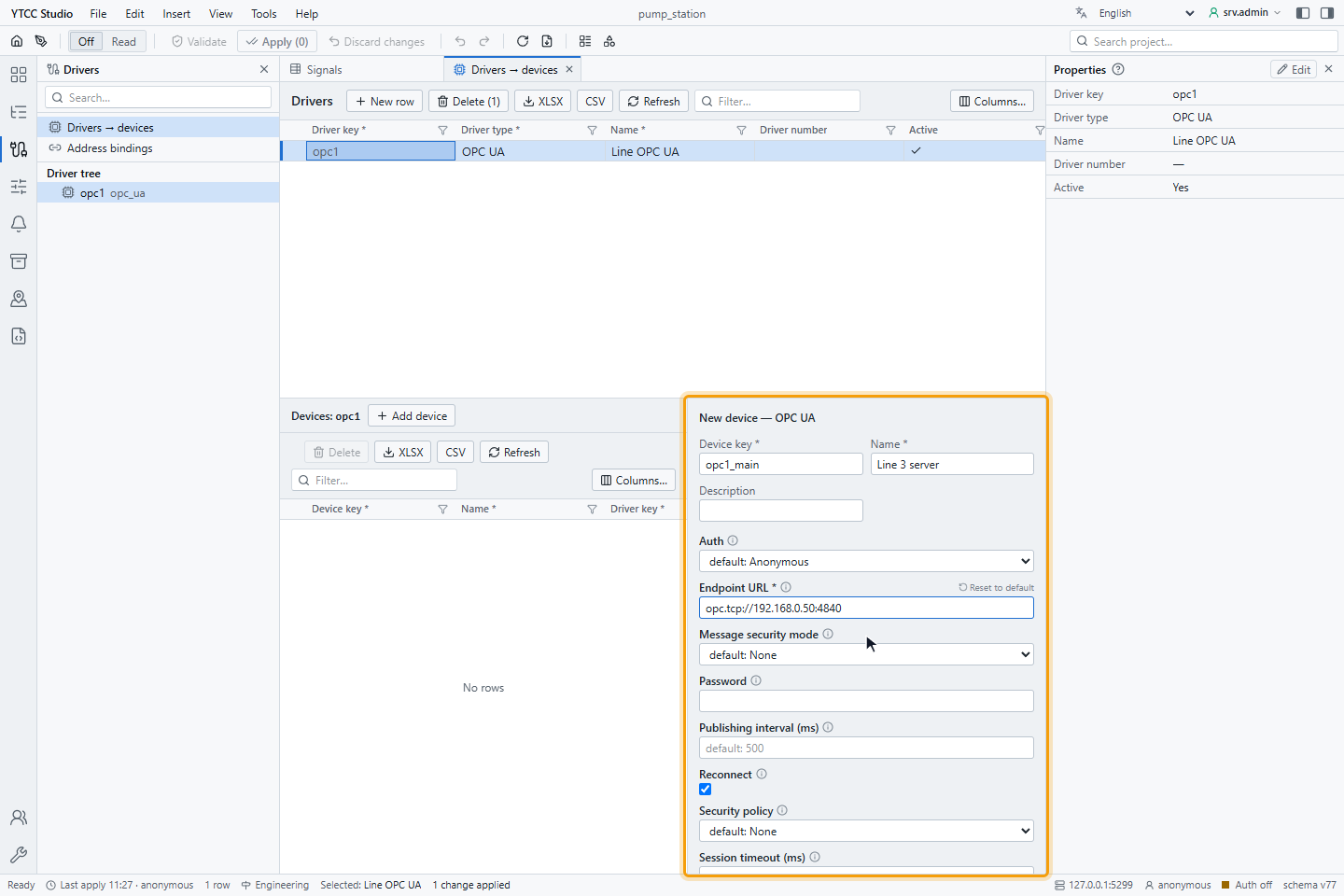
| Parameter | Default | Meaning |
|---|---|---|
| Endpoint URL | — (required) | Address of the server, for example opc.tcp://192.168.10.50:4840. |
| Security policy | None | None, Basic256Sha256, Aes128Sha256RsaOaep or Aes256Sha256RsaPss. |
| Message security mode | None | None, Sign or SignAndEncrypt. |
| Auth | Anonymous | Anonymous or Username. |
| Username, Password | — | User for Username authentication. |
| Publishing interval (ms) | 500 | How often the server sends changes of the subscription. |
| Session timeout (ms) | 60000 | Session timeout requested from the server. |
| Reconnect | on | Leave it on. A broken session is reopened automatically; see Reconnecting. |
| Set invalid on disconnect | on | Leave it as it is. What a connection loss does is described in Reconnecting. |
| Trust server certs | off for a new device | Trust every server certificate without checking. |
The security policy and mode must match an endpoint the server offers, or the connection fails. Changing Publishing interval (ms) rebuilds only the subscription; changing any other parameter reconnects that server. An invalid device does not start and shows the reason; the other servers of the driver keep running.
Certificates and users
- Client certificate. The driver creates its own application certificate (YTCC OPC-UA Client) when it first starts. For a secured connection, the server must trust it: after the first attempt, it is usually in the server's rejected list; move it to the trusted list.
- Server certificate. With Trust server certs off, the server certificate must be in the trusted folder of the driver; the certificate of an unknown server is put in the rejected folder. Move it to the trusted folder after you have checked it. With Security policy None, certificates are not used.
- User. With Username, create the user on the server and give it read rights on the nodes, and write rights on the nodes YTCC writes. The password is stored in the device settings as text; restrict who may edit the configuration.
Signal address
Set the address on the Value source tab of the signal, under Address — OPC UA:
| Field | Meaning |
|---|---|
| Namespace | Namespace index, for example 2. |
| Id type | s (string) or i (numeric). |
| Identifier | The identifier, for example Pump4.Current or 2258. |
| Queue size | Values the server keeps between two publishes (default 1: only the latest). |
| Deadband (abs) | Change the server must see before it sends a new value, in the units of the node. |
The Scan class of the signal is the sampling interval of the server. In import files, write the node ID as
ns=2;s=Pump4.Current or ns=0;i=2258 (see Import and export with Excel or CSV). In a CSV file separated by semicolons, put the address in double quotes, for example "ns=2;s=Pump4.Current".
Copy the node IDs from the server's documentation or from an OPC UA browser tool.
Reading
The driver uses subscriptions, not polling. Each signal is a monitored item with the sampling interval of its scan class (1 s by default), its queue size and its deadband. The server sends changes at the Publishing interval (ms) of the device. A node the server rejects, for example because it does not exist, is Bad; the others are read normally.
Data types
| OPC UA type | Value in YTCC |
|---|---|
| Boolean | On or off |
| SByte, Int16 | Int16 |
| Byte, UInt16 | UInt16 |
| Int32, UInt32, Int64, UInt64 | same |
| Float | Float32 |
| Double | Float64 |
| String | Text |
Bind signals to nodes of the types in this table.
Writing
A signal can be written when its Access is Read / Write or Write only. The value is written to the Value attribute of the node with the type of the signal, so the signal's data type must match the node's type; otherwise the server answers BadTypeMismatch.
| Server status | Shown as |
|---|---|
| BadNotWritable, BadWriteNotSupported | Signal is not writable |
| BadTypeMismatch | Value type not suitable |
| BadOutOfRange | Value out of range |
| BadUserAccessDenied | Device does not allow writing |
| BadNodeIdUnknown | Signal not found |
| BadNotConnected | No device communication |
| BadTimeout, BadRequestTimeout, BadConnectionClosed | No response from device |
| other | Device returned an error |
A command sent while the driver is not connected to the server is rejected with No device communication.
If the signal is set to read back after writing, the driver reads the node again right after a successful write.
Status codes and time stamps
| OPC UA status | Quality in YTCC |
|---|---|
| Good | Good |
| Uncertain | Uncertain |
| BadNotConnected | Bad · Not connected |
| other Bad, or no status | Bad |
The time of a value is the SourceTimestamp of the server (time source device); the server timestamp is not used. Without a source timestamp, or with one more than 5 minutes ahead or 7 days behind the arrival time, the arrival time is used.
Reconnecting
If the first connection fails, the driver tries again after 1 second and doubles the wait up to 30 seconds. An open session that breaks is reopened automatically, and the subscription is created again. When the connection is lost, the device shows not connected and the communication alarm comes; the signals keep their last value.
Diagnostics
Read now on the Value source tab reads the node once through the open session:
| Text | Meaning |
|---|---|
| A value | The server answered |
| OPC UA BadNodeIdUnknown — ns=2;s=… | The node does not exist on the server |
| OPC UA value type not supported — … | The node has a type that is not in Data types |
| Not connected — … ; … was not read | No session to the server |
| Invalid node id '…' | The address cannot be parsed |
| Symptom | Likely cause |
|---|---|
| The device never connects | Wrong endpoint URL; no endpoint with the chosen policy and mode; firewall |
| Secure connection refused | The server does not trust the YTCC certificate, or YTCC does not trust the server certificate |
| User rejected | Wrong user or password, or the server does not allow user name login |
| One signal Bad | The node does not exist, or the user may not read it |
| A signal never changes | The value does not change, or Deadband (abs) is too large |
| A signal shows 0 although the node has a value | The node type is not in Data types |
Supported services
| Service | Supported |
|---|---|
| Secure channel and session (four policies, three modes) | Yes |
| Anonymous and user name identity | Yes |
| Read | Yes (Read now, read-back) |
| Write (Value attribute) | Yes |
| Subscriptions and monitored items, absolute deadband | Yes |