BACnet/IP
The BACnet/IP driver reads and writes objects of building automation controllers: air handling units, chillers, room controllers and meters. For what all drivers have in common, see How drivers work.
Protocol and role
| Role | Client. YTCC reads and writes properties of BACnet devices; it is not a BACnet device itself. |
| Transport | BACnet/IP over UDP. Devices on MS/TP are reached through their BACnet router. |
| Default port | 47808 (UDP) |
| Devices per driver | One driver is one BACnet network (local address and port) with any number of devices. |
| Driver type | BACnet (bacnet) |
Driver parameters (network)
Set these on the driver in Drivers → devices.
| Parameter | Default | Meaning |
|---|---|---|
| Local IP | 0.0.0.0 | Local network interface; 0.0.0.0 uses all. |
| Local port | 47808 | Local UDP port. With another port, devices' broadcast answers are not received: use a fixed Host per device or a BBMD. |
| Broadcast | 255.255.255.255 | Address for Who-Is. On Windows use the directed broadcast of the network, for example 192.168.1.255. |
| Bbmd | empty | Foreign device registration, as JSON: {"host": "…", "port": 47808, "ttl_s": 600}. Who-Is then goes through the BBMD. |
| Max requests per s | 200 | Most confirmed requests per second on the network. |
| Router requests per s | 50 | Most requests per second to devices behind one router. |
| Cov lifetime (s) | 600 | Lifetime of COV subscriptions (60–86400). |
| Cov confirmed | off | Ask for confirmed COV notifications. |
| Cov verify (s) | 300 | Extra read of COV signals at this interval, in case a notification was lost. |
| Apdu timeout (ms), Apdu retries | 3000, 3 | Wait and repeats for a confirmed request; a device can override them. |
| Who is chunk | 100 | Device instances covered by one Who-Is during a scan. |
Changing a network parameter reopens the UDP socket; devices reconnect after a moment.
Device parameters
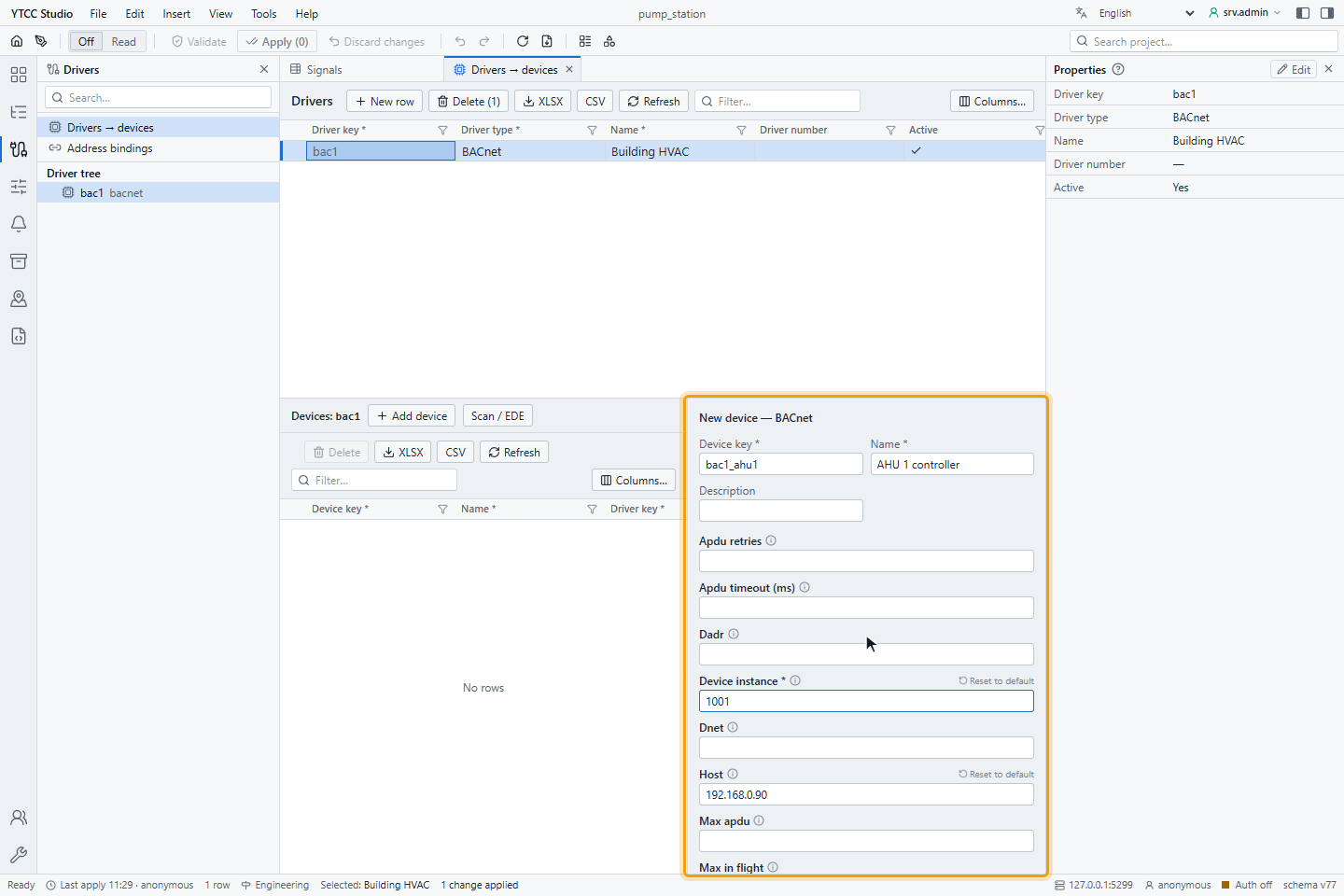
| Parameter | Default | Meaning |
|---|---|---|
| Device instance | — (required) | Instance of the device object, 0–4194302. Unique in the driver. |
| Host, Port | empty, 47808 | Fixed address of the device. Empty: the address is found with Who-Is / I-Am. For a device behind a router: the router's address. |
| Dnet, Dadr | empty | Network number and MAC address behind a router (for example MS/TP MAC 0A); both together, with Host. |
| Max apdu, Segmentation | from I-Am | Override what the device reports. |
| Max in flight | 2 | Read requests at the same time; use 1 behind an MS/TP router. |
| Apdu timeout (ms), Apdu retries | from the network | Override for this device. |
| Poll (ms) | 1000 | Read period for signals without their own scan class. |
The help mark next to each parameter shows a short description.
Signal address
Set the address on the Value source tab of the signal, under Address — BACnet:
| Field | Meaning |
|---|---|
| Object type | Analog-input, Analog-output, Analog-value, Binary-input, Binary-output, Binary-value, Multi-state-input, Multi-state-output or Multi-state-value |
| Instance | Object instance, 0–4194302 |
| Property | Present-value (85) |
| Array index | For array properties; empty for none |
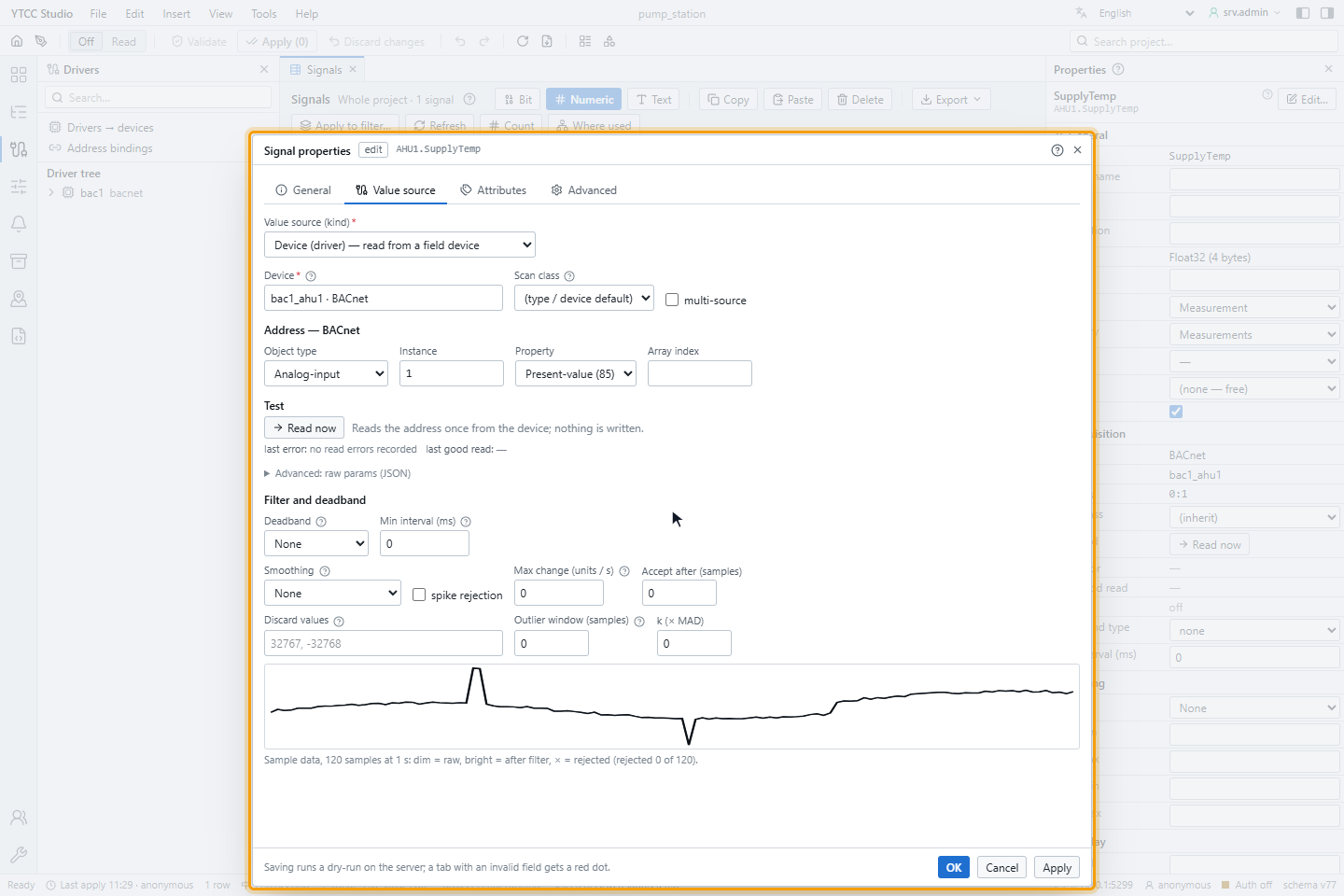
In import files, write the numeric object type and the instance separated by a colon, for example 0:1 (analog input 1)
or 5:12 (binary value 12). Other object types (for example integer-value 45, large-analog-value 46) and other
properties can be set in Advanced: raw params (JSON) or come from a device scan.
Values
| BACnet value | Value in YTCC |
|---|---|
| Real, Double | Float32, Float64 |
| Boolean; Enumerated of a binary object | On or off |
| Enumerated (other), Unsigned | UInt32 |
| Signed | Int32 |
| CharacterString, date, time | Text |
Reading
Signals are polled by default: Present_Value, Status_Flags and Reliability are read together with ReadPropertyMultiple (ReadProperty if the device does not support it), and requests that are too large are split.
COV (change of value) can be used for Present_Value without an array index: set "receive": "cov" in Advanced: raw
params (JSON), or choose COV when you create signals from a scan. The driver subscribes with Cov lifetime (s),
renews at 60 % of it, and reads the value again every Cov verify (s). A device that refuses the subscription is
polled instead.
Writing
A BACnet signal is written with WriteProperty at a priority (default 8, 1–16). Writing an empty value (relinquish) releases the priority again; YTCC relinquishes at the priority of the last command it sent.
A BACnet signal is written when its direction is out or inout; a signal whose direction is in rejects every
command. Set "direction": "inout" (and, if needed, "write_priority": 8) in Advanced: raw params (JSON), or create
the signals from a device scan with Read + write.
- Analog objects are written as REAL, binary objects as ENUMERATED (0 or 1), multi-state objects as UNSIGNED.
- After a successful write, the value is read back at once.
- A refusal of the device is shown with its error, for example property/write-access-denied. A device that does not answer is checked with a read; only if that also fails is it marked not connected.
For how operators send and confirm commands, see Send commands.
Quality
| Device state | Quality in YTCC |
|---|---|
| FAULT in Status_Flags, or Reliability not "no fault detected" | Bad |
| OUT_OF_SERVICE | Uncertain |
| OVERRIDDEN | Good · Substituted |
| IN_ALARM | Good (an alarm of the device is not a fault) |
| none | Good |
When a device does not answer, all its signals are Bad · Not connected and keep their last value; the other devices are not affected. The time of a value is the time it was read.
Reconnecting
A device that does not answer after Apdu timeout (ms) × Apdu retries is marked not connected and tried again after 1 second, doubling the wait up to 60 seconds.
Device scan and EDE import
In Drivers → devices, select the BACnet driver and click Scan / EDE:
- Scan sends Who-Is for a range of device instances (or a list of devices), reads the object list of each device that answers, and the names, descriptions and units of its objects. A range of 0 – 0 asks every device.
- Upload EDE reads an EDE file (EDE 2.x, separated by semicolons, up to 64 MB) instead.
- The result shows each object as New, In system or Missing on device. Select rows and click Create signals from selection; choose the signal type, area, receive mode (Periodic or COV) and direction (Read only or Read + write). A dry run shows the changes before they are applied.
One scan or upload runs per driver at a time, and a scan stops after 30 minutes.
Diagnostics
Read now on the Value source tab sends one ReadProperty for the address and shows the value and its type, or the error as class/code, reject: … or abort: ….
The Communication diagnostics panel of the device (see Check the communication of a device) counts under Timeouts / retries every confirmed request that got no answer within Apdu timeout (ms), and every repeat of it. Requests of a device scan are not counted.
| Symptom | Likely cause |
|---|---|
| No device answers | UDP port 47808 is used by another program; on Windows, broadcast 255.255.255.255 leaves through one interface only |
| Devices in another subnet are not found | Use a BBMD (Bbmd) or fixed Host addresses |
| Devices behind an MS/TP router time out | Set Dnet, Dadr and Max in flight 1 |
| Signal Uncertain | The object is out of service |
| Command rejected as Signal is not writable | Direction is in; set out or inout as described under Writing |
Supported BIBBs
| BIBB | Supported |
|---|---|
| DS-RP-A ReadProperty | Yes |
| DS-RPM-A ReadPropertyMultiple | Yes |
| DS-WP-A WriteProperty (priority, relinquish) | Yes |
| DS-COV-A SubscribeCOV | Yes |
| DM-DDB-A dynamic device binding (Who-Is / I-Am) | Yes |