MQTT client
The MQTT client driver connects to an MQTT broker, subscribes to topics and turns their messages into signal values. Use it for IoT gateways, edge devices and other systems that publish their values over MQTT. For what all drivers have in common, see How drivers work.
To run a broker inside YTCC, see MQTT broker.
Protocol and role
| Role | MQTT client. YTCC subscribes to topics and publishes commands. |
| Version | MQTT 3.1.1 over TCP |
| Default port | 1883 |
| Devices per driver | One device is one broker connection. |
| Driver type | MQTT (mqtt) |
Values arrive when the publisher sends them; the driver does not poll. A retained message gives a signal its first value as soon as the driver subscribes.
Device parameters
Set these on the device in Drivers → devices (see Add drivers and devices). An empty box uses the default shown in it. The help mark next to each parameter shows a short description.
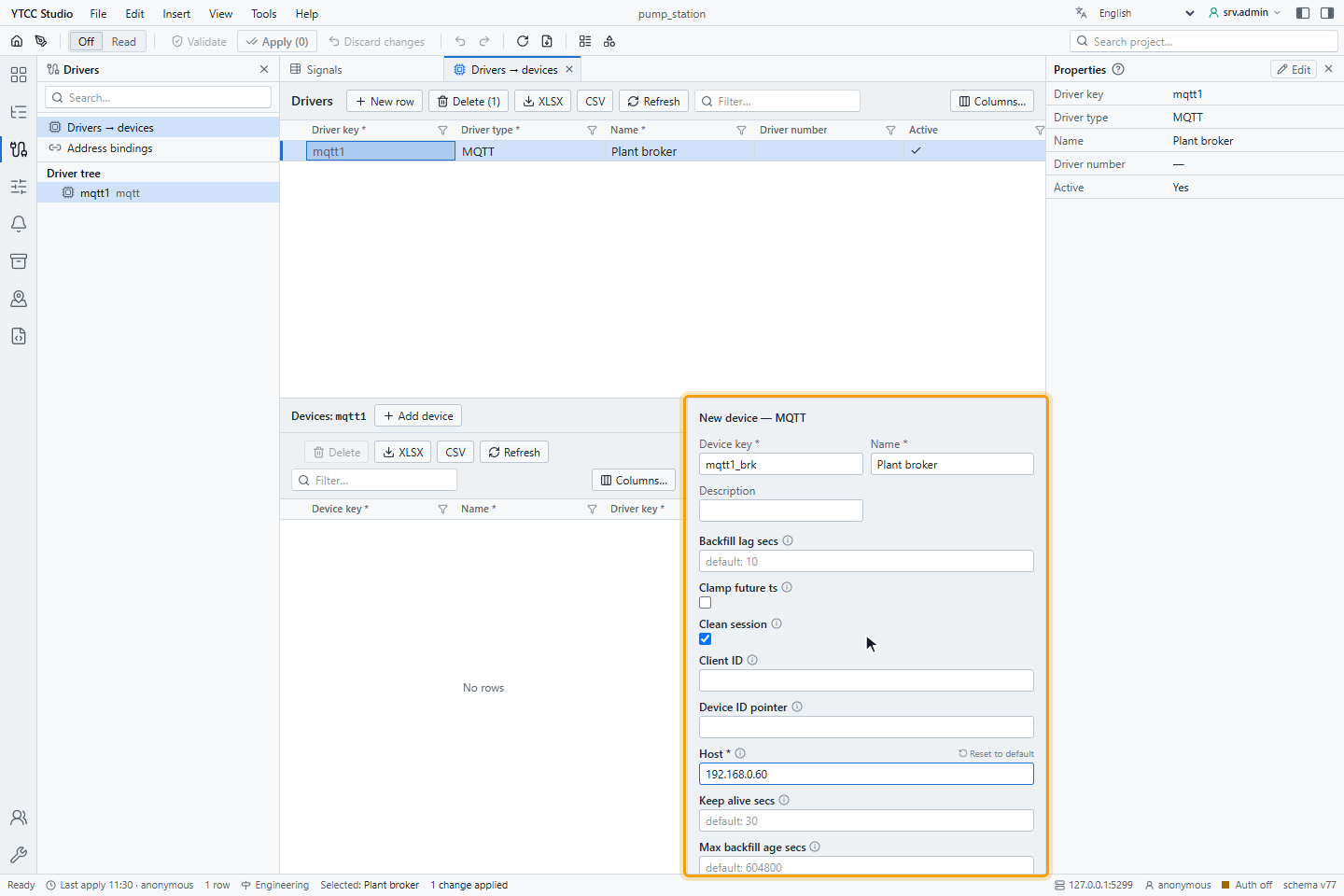
| Parameter | Default | Meaning |
|---|---|---|
| Host | — (required) | IP address or host name of the broker. |
| Port | 1883 | TCP port of the broker, 1–65535. |
| Client ID | ytcc- and the driver key | Name of the connection at the broker. |
| Username, Password | empty | Credentials; used only when both are set. |
| Keep alive secs | 30 | Interval of the keep-alive messages, in seconds. |
| Clean session | on | Start each connection without the subscriptions and messages of an earlier session. |
| Max inflight | 100 | Most QoS 1 and 2 messages that wait for an acknowledgement. |
| Set invalid on disconnect | on | When the connection is lost, mark all signals as Bad · Not connected. |
| Max future skew secs | 5 | Most seconds a device time in a message may be ahead of the arrival time; a value further ahead is dropped. See Device time and buffered data. |
| Max backfill age secs | 604800 (7 days) | Most seconds a device time may be behind the arrival time; an older value is dropped. |
| Backfill lag secs | 10 | A value whose device time is more than this behind the arrival time is counted as buffered data. It only feeds a counter and changes nothing else. |
| Clamp future ts | off | On: a value whose device time is more than Max future skew secs ahead is not dropped. It takes the arrival time and the time source device time invalid. |
| Seq pointer | empty | The place of a sequence number in a JSON message, for example /seq. Empty: lost messages are not counted. See Lost messages. |
| Device ID pointer | empty | The place of the device name in a JSON message, for example /dev, for sequence numbers counted per device. Empty: each topic counts as one device. |
The Client ID must be unique at the broker: a second connection with the same name, for example the same driver key in a test project, disconnects the first one, and both keep reconnecting. Give each YTCC system its own client ID.
Keep the broker and YTCC in a protected network. Give YTCC its own user at the broker; where the broker supports topic permissions, limit that user to the topics it needs.
Signal address
Set the address on the Value source tab of the signal, under Address — MQTT:
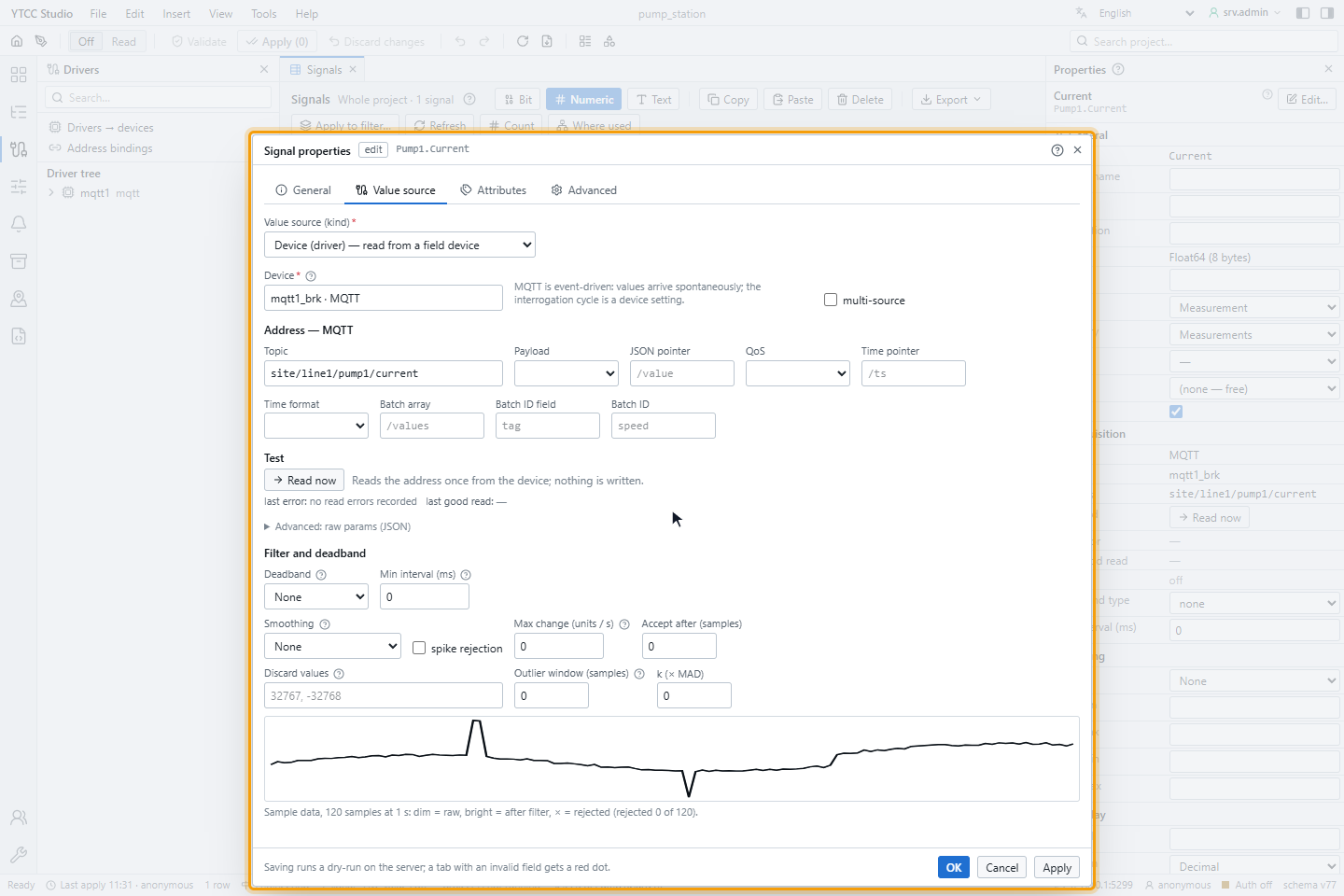
| Field | Default | Meaning |
|---|---|---|
| Topic | — | The exact topic, for example site/line1/pump1/current. |
| Payload | Raw | Raw: the message is the value as text. JSON: the value is taken from a JSON message. |
| JSON pointer | empty | With JSON: the place of the value in the message, for example /value or /data/0/temp. Empty uses the whole message. |
| QoS | 0 | Quality of service of the subscription and of commands: 0, 1 or 2. |
| Time pointer | empty | With JSON: the place of the device time in the message, for example /ts. Empty: the value takes the arrival time. |
| Time format | auto | auto, epoch ms, epoch s or RFC 3339. auto reads a number above 10^11 as milliseconds and a smaller one as seconds since 1970 (UTC), and a text as RFC 3339 with a time zone, for example ...Z or ...+03:00. |
| Batch array | empty | For a message with a list of values: the place of the list, for example /values. JSON pointer and Time pointer are then relative to one entry of the list, for example /v and /ts. |
| Batch ID field | tag | The field of a list entry that names the value. |
| Batch ID | the signal path | The name of this signal in that field, for example speed. A number is compared as text. |
In import files, write the topic in the address column; payload and QoS take their defaults, Raw and 0.
Payloads
| Payload | Example message | Value |
|---|---|---|
| Raw | 42.5 | 42.5 |
| Raw | true, false | On or off |
| Raw | RUN | Text |
JSON, pointer /value | {"value": 42.5, "unit": "A"} | 42.5 |
JSON, pointer /state/run | {"state": {"run": true}} | On |
A JSON value must be a number, true or false, or a text. A message that cannot be decoded (not text, empty, invalid JSON, the pointer not found, or the value is a list or an object) makes the signal Bad. Do not use the value of a Bad signal.
Each signal has its own topic. To read several values from one JSON message, create one signal per value with the same topic and different JSON pointers.
Device time and buffered data
Many field devices, for example vehicle units and RTUs on mobile networks, keep their values while the connection is down and send them with their original time when it returns. Set Time pointer to read that time. Two message forms are read.
One value with its time (JSON pointer /v, Time pointer /ts):
{ "v": 42.5, "ts": 1760090400123 }
A list of values (Batch array /values, Batch ID field tag, JSON pointer /v, Time pointer /ts,
and on each signal its Batch ID). An entry without its own ts takes the ts at the top of the message:
{
  "ts": 1760090400000,
  "values": [
    { "tag": "speed",       "ts": 1760090400123, "v": 42.5 },
    { "tag": "door_1_open", "ts": "2025-10-10T09:00:00.500Z", "v": true }
  ]
}
Entries whose name matches no signal are skipped, and signals missing from a message are left as they are. An entry without a value makes its signal Bad. Without a time field the value takes the arrival time; a time field that cannot be read gives the arrival time with the time source device time invalid.
Each value is then handled by its device time:
| Device time | History | Current value | Live alarm, script onChange |
|---|---|---|---|
| None | Stored with the arrival time | Updated | Yes |
| Not older than the last device time of the signal | Stored with the device time | Updated | Yes |
| Older than the last device time (late) | Stored with its original time | Unchanged | No |
| More than Max future skew secs ahead of the arrival | Dropped | — | — |
| The same, with Clamp future ts on | Stored with the arrival time, time source device time invalid | Updated | Yes |
| More than Max backfill age secs behind the arrival | Dropped | — | — |
| Same signal, time and value received again, for example a QoS 1 redelivery | Not stored again | — | — |
| Same signal and time with another value | Stored | Updated (the later one wins) | Yes |
In a message with valid and invalid entries, only the invalid ones are dropped. Several signals can use the same topic; each of them reads the message.
- Dropped values are written to the driver log, at most once a minute with the number dropped.
- For the device: use QoS 1 with a persistent session, send buffered values oldest first in batches of 100 to 500, let live values go before the buffer, and synchronise the device clock. If the clock cannot be trusted, send no time; YTCC then uses the arrival time. Fix a clock that runs ahead rather than raising Max future skew secs. If the clock cannot be fixed but the values are needed, turn on Clamp future ts: the values are kept, with the arrival time instead of the device time.
How late values are treated on screens, in alarms and in scripts is described in Time stamps and time zones.
Lost messages
A device that numbers its messages shows when messages were lost, for example when its buffer overflowed during an
outage. Set Seq pointer to the place of the number, for example /seq in
{"dev": "OBU-1", "seq": 918273, "values": [...]}. If several devices publish to the same topic, also set
Device ID pointer, for example /dev; otherwise the topic stands for the device.
The driver keeps the last number of each device and compares it with the next message:
- The last number plus 1 is expected. A larger number is counted as a gap, and the numbers in between as lost messages.
- 0 or 1 after a larger number is counted as a restart of the device.
- A smaller number, for example from a QoS 1 redelivery, is ignored.
- The number can be a JSON number or a text with a number. A message without the field is not counted.
- At most 100 000 devices are tracked per driver; devices beyond that are not counted.
The count does not bring lost messages back and does not change any value. A gap is written to the driver log as a warning with the device and the number of lost messages, at most once a minute. Every 60 seconds, when they have changed, the driver log also gets the totals of gaps, lost messages and restarts, together with the device time counters.
Writing
A signal can be written when its Access is Read / Write or Write only. The command is published to the topic of the signal with
its QoS, not retained, as plain text: true or false, or the number or text.
- The result is Unconfirmed: the broker accepting the message does not mean that the device has acted on it.
- To see the state of the device, bind the state to a separate signal on the device's own status topic.
- A command is rejected at once when the broker is not connected; commands are not stored and sent later.
For how operators send and confirm commands, see Send commands.
Quality
| Situation | Quality |
|---|---|
| A message was decoded | Good |
| A message could not be decoded | Bad |
| The connection to the broker is lost | Bad · Not connected (with Set invalid on disconnect); the last value stays |
A value takes the time it arrived unless Time pointer is set (see Device time and buffered data). After a reconnect a signal stays Bad · Not connected until its next message arrives; a retained message arrives at once.
Reconnecting
After the connection is lost, the driver tries again every 2 seconds and subscribes to all topics again. Changing Host, Port, the client ID or the credentials reconnects; adding or removing signals changes the subscriptions without a reconnect.
Diagnostics
Values arrive by subscription, so Read now does not read the broker. The line under it shows the last error of the signal, for example:
| Text | Meaning |
|---|---|
| Payload is not valid JSON: … | Payload is JSON, the message is not |
| JSON pointer … not found in payload | The pointer does not match the message |
| JSON value at … is not a number, boolean or string | The pointer points to a list or an object |
| Payload is not UTF-8 text, Empty payload | The message is binary or empty |
| Symptom | Likely cause |
|---|---|
| The device never connects | Wrong host or port, the broker requires a user, the user or password is wrong |
| Connected, a signal never gets a value | The topic differs (upper and lower case count), or nothing has been published since the driver started and the message is not retained |
| The connection drops every few seconds | Another client uses the same Client ID |
| A signal Bad | The message does not match Payload or JSON pointer |