Beckhoff ADS
The ADS driver reads and writes variables of Beckhoff TwinCAT 2 and TwinCAT 3 PLCs by their symbol names. It connects directly to the AMS router of the PLC; no TwinCAT installation is needed on the YTCC server. For what all drivers have in common, see How drivers work.
Protocol and role
| Role | ADS client. YTCC connects to the PLC. |
| Transport | ADS over TCP (AMS/TCP) |
| Default port | 48898 |
| AMS target | NetId of the PLC (for example 5.32.116.5.1.1) and AMS port: 851 for TwinCAT 3 PLC 1, 852 for PLC 2, 801 for TwinCAT 2 |
| Devices per driver | Any number of ADS targets. All targets on the same PLC share one TCP connection. |
| Driver type | ADS (ads) |
What the PLC needs
- A route. The PLC accepts ADS only from known partners. Choose the NetId of YTCC, preferably by setting Source net
ID (for example
192.168.0.5.1.1). In TwinCAT XAE, under SYSTEM › Routes › Add Route, add a route with that AMS NetId, transport TCP/IP and the IP address of the YTCC server. On TwinCAT/BSD and CE you can add it toStaticRoutes.xmlinstead. - The firewall of the PLC must allow TCP 48898.
- One connection per PLC. A PLC accepts one ADS connection from one partner: a second one (for example TwinCAT XAE on the YTCC server, or a second driver) replaces the first. Put all targets of a PLC in the same driver.
Device parameters
Set these on the device in Drivers → devices (see Add drivers and devices). An empty box uses the default shown in it. The help mark next to each parameter shows a short description.
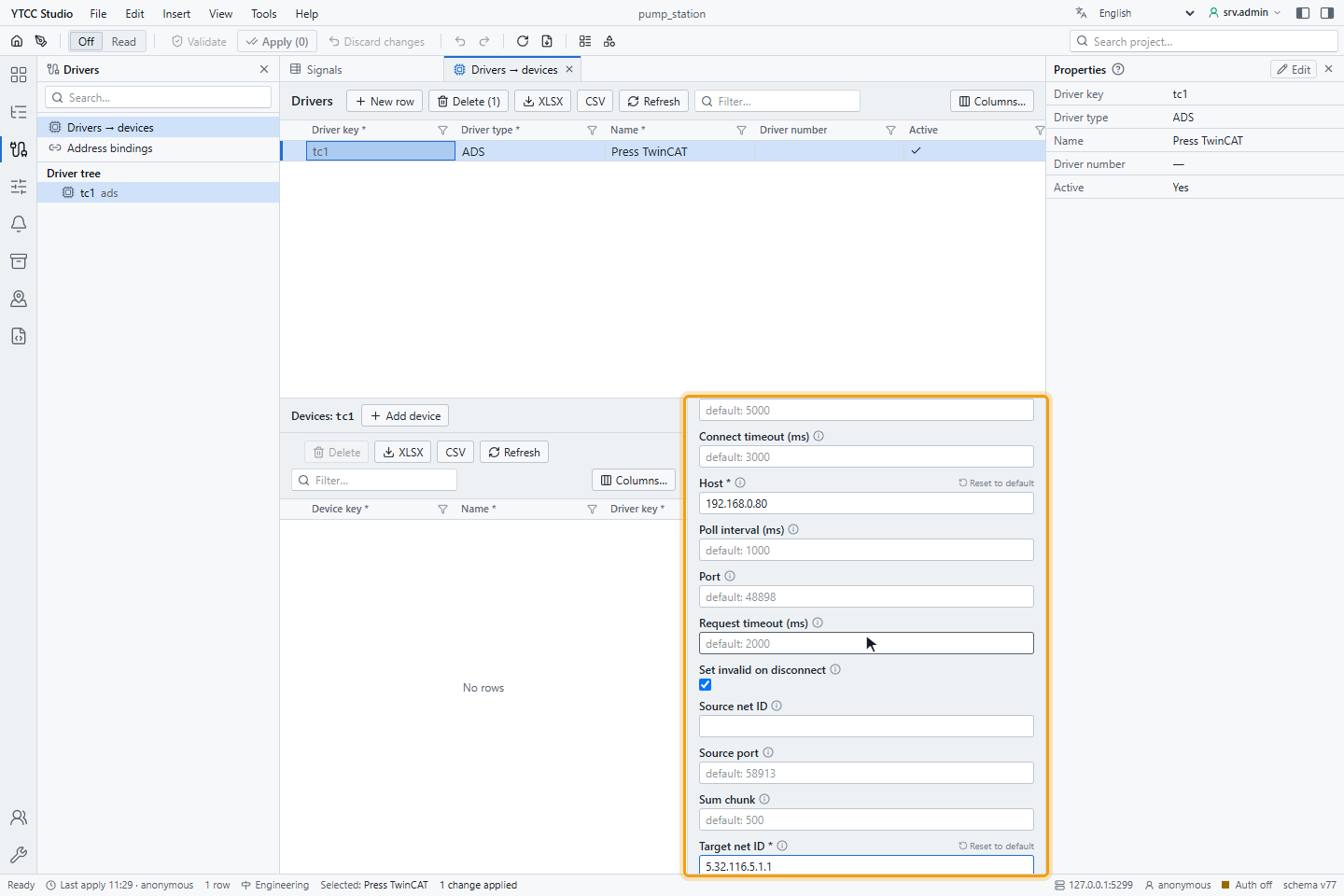
| Parameter | Default | Range | Meaning |
|---|---|---|---|
| Host | — (required) | IP address or host name | Address of the PLC. |
| Port | 48898 | 1–65535 | AMS/TCP port. |
| Target net ID | — (required) | six numbers 0–255 | AMS NetId of the PLC. |
| Target port | 851 | 1–65535 | AMS port of the PLC runtime. |
| Source net ID | empty | six numbers 0–255 | AMS NetId of YTCC; must match the route on the PLC. Empty uses the server's IP address plus .1.1. |
| Source port | 58913 | 1–65535 | AMS port of YTCC, used with Source net ID. |
| Connect timeout (ms) | 3000 | 100–60000 | How long the driver waits when it connects. |
| Request timeout (ms) | 2000 | 100–60000 | How long one request may take; a longer wait counts as a lost connection. |
| Poll interval (ms) | 1000 | 10–3600000 | Read period for signals without their own scan class. Below 100 ms is not recommended. |
| Sum chunk | 500 | 1–500 | Most variables read in one batched request. |
| Cmd timeout (ms) | 5000 | 100–600000 | How long a command may wait before it is rejected as expired. |
| Set invalid on disconnect | on | on / off | When the connection is lost, mark all signals of the target as Bad · Not connected. |
Changing Host, Port, the source or the timeouts reconnects the PLC; the other parameters take effect at once. Targets on the same host and port must have the same source and timeouts, otherwise the later target does not start.
Signal address
Set the address on the Value source tab of the signal, under Address — ADS: the Symbol (the variable name as in the PLC program), the Data type and, for text, the String length:
| Symbol | Meaning |
|---|---|
MAIN.fTemperature | Variable of the program MAIN |
GVL.aValues[3] | Element of an array in a global variable list |
MAIN.stMotor.bRun | Member of a structure |
Symbol names are not case-sensitive and contain no spaces. The driver finds the address of each symbol when it connects and again after an online change or a download of the PLC program.
Data types
| Data type | Size | Value in YTCC |
|---|---|---|
| BOOL | 1 byte | On or off |
| BYTE, USINT | 1 byte | UInt16 |
| SINT | 1 byte | Int16 |
| WORD, UINT | 2 bytes | UInt16 |
| INT | 2 bytes | Int16 |
| DWORD, UDINT | 4 bytes | UInt32 |
| DINT | 4 bytes | Int32 |
| LWORD, ULINT | 8 bytes | UInt64 |
| LINT | 8 bytes | Int64 |
| REAL | 4 bytes | Float32 |
| LREAL | 8 bytes | Float64 |
| STRING(n) | n + 1 bytes | Text (n 1–255, default 80) |
The size of the symbol in the PLC must match the data type; otherwise the signal is Bad. To read a structure or an array, bind each member or element as its own signal.
Reading
The driver polls with batched reads: up to Sum chunk variables (and 64 KB) in one request. Each round also reads the symbol version of the PLC; if it changed (online change, download), the addresses are found again before the values are used. A symbol that cannot be found is Bad and is tried again every 30 seconds. If the PLC does not support batched reads, the driver reads one variable at a time.
The driver also checks every 10 seconds whether the PLC is in RUN. In another state, values are still read but may not change, and the device status says that the PLC is not in RUN.
Writing
A signal can be written when its Access is Read / Write or Write only. The value is converted to the data type: integers are checked against their range, a fraction for an integer type is rejected, a BOOL takes 0 or 1, and text must fit the string length. Writes are never repeated; if the connection breaks during a write, the PLC may or may not have taken the value.
For how operators send and confirm commands, see Send commands.
Quality
| Situation | Quality |
|---|---|
| The variable was read | Good |
| Symbol not found, size mismatch, read error | Bad; the last value stays |
| The connection is lost, or the AMS target does not answer | Bad · Not connected (with Set invalid on disconnect); the last value stays |
The time of a value is the time it was read; the PLC sends no time stamp.
Reconnecting
After the connection is lost, the driver tries again after 100 ms and doubles the wait up to 20 seconds. The wait starts from 100 ms again only after the PLC has answered, so a PLC without a route is not flooded with attempts.
Diagnostics
Read now on the Value source tab reads the symbol once through the existing connection and shows the value and the raw bytes:
| Text | Meaning |
|---|---|
| No connection to ads://… | The PLC is not connected |
| Timeout — no response from … within 2000 ms | The PLC did not answer |
| Symbol is missing | No symbol entered |
| ADS error — … (symbol …, device …) | The PLC refused the read, for example Symbol not found |
| Size mismatch — symbol … is … bytes, the data type needs … | Data type or String length does not match the variable |
| ADS target is not answering … | Wrong Target net ID or Target port, or the runtime is not running |
| Symptom | Likely cause |
|---|---|
| The PLC closes the connection at once | No route on the PLC, or the route's NetId differs from Source net ID |
| Connected, all signals Bad · Not connected | Wrong Target net ID or Target port |
| Values do not change | The PLC is not in RUN |
| One signal Bad | Symbol misspelled or not in the program; wrong Data type |
| Connection drops every few seconds | A second ADS partner (TwinCAT XAE, another driver) connects to the same PLC |
Supported ADS commands
| Command | Supported |
|---|---|
| Read | Yes |
| Write | Yes |
| ReadWrite (finding symbols) | Yes |
| ReadState | Yes |
| Sum read, sum read-write | Yes |