DNP3
The DNP3 driver connects YTCC as a master to DNP3 outstations: RTUs, IEDs, recloser controllers and pump station controllers. For what all drivers have in common, see How drivers work.
Protocol and role
| Role | Master (IEEE 1815-2012, level 4 master). |
| Transports | TCP (YTCC connects), Tcp listen (the outstation connects), UDP, TLS, Tls listen, Serial |
| Default port | 20000 |
| Devices per driver | Any number of outstations. Outstations on the same endpoint share one channel. |
| Link addresses | Master address on the driver, link address on each outstation, 0–65519 |
| Driver type | DNP3 (dnp3) |
Driver parameters
Set these on the driver in Drivers → devices.
| Parameter | Default | Range | Meaning |
|---|---|---|---|
| Master address | 1 | 0–65519 | Link address of YTCC. It must differ from every outstation's link address. |
| Max requests per (s) | 200 | 1–10000 | Most requests per second for all outstations of the driver together. |
| Secrets dir | empty | folder | Folder with key and certificate files. Empty uses the secrets/dnp3/<driver key> folder of the project. |
Outstation parameters
Set these on the device. An empty box uses the default shown in it. The help mark next to each parameter shows a short description.
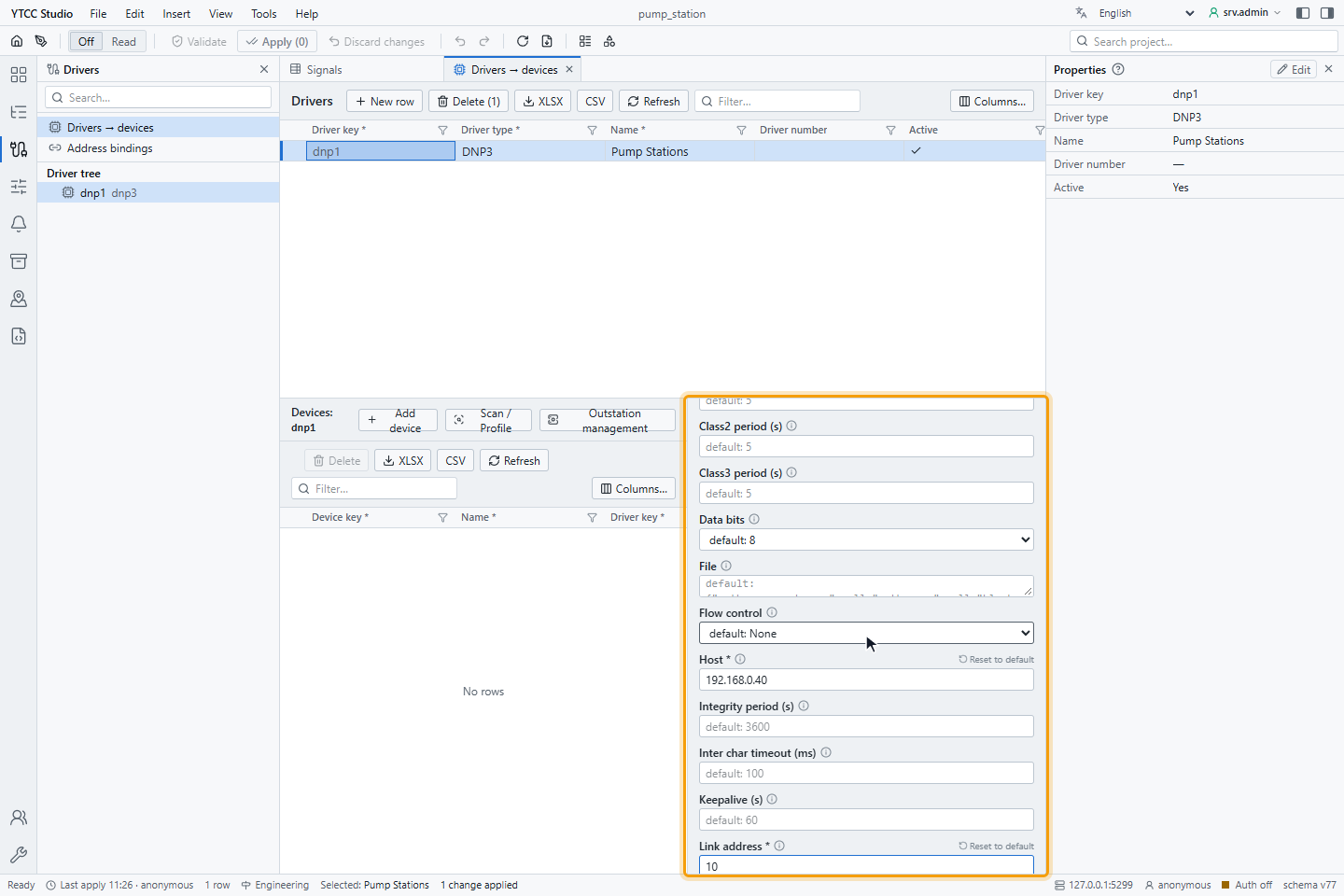
Connection
| Parameter | Default | Meaning |
|---|---|---|
| Transport | TCP | TCP, Tcp listen, UDP, TLS, Tls listen or Serial. |
| Host | — | Address of the outstation (for listen modes: the address the outstation connects from). |
| Port | 20000 | TCP or UDP port. |
| Local port, Bind | — | Local port and address, for UDP and listen modes. |
| UDP mode | Udp only | Udp only or Tcp request udp broadcast. |
| Tcp broadcast gateway | off | Send broadcast requests over a TCP or TLS connection, for a gateway that passes them on to a serial line. When off, broadcasts go only over Serial and UDP, or over UDP with Tcp request udp broadcast. |
| Link address | — (required) | Link address of the outstation, 0–65519. Unique on a channel. |
| Keepalive (s) | 60 | Link status request when the line is quiet; 0 is off. |
| Port name, Baud, Parity, Data bits, Stop bits, Flow control, Rs485, Rts toggle, Tx delay (ms), Rx after tx (ms), Inter char timeout (ms) | 9600, None, 8, 1, None … | Serial line settings. |
Link and application layer
| Parameter | Default | Range | Meaning |
|---|---|---|---|
| Link confirm | Never | Never / Always | Ask for link-layer confirmation of each frame. |
| Link timeout (ms) | 1000 | 100–60000 | Wait for a link-layer answer. |
| Link retries | 2 | 0–10 | Link-layer repeats. |
| Link reset on connect | off | — | Reset the link when the connection opens. |
| Response timeout (ms) | 5000 | 100–300000 | Wait for the answer to a request. |
| App retries | 0 | 0–10 | Application-layer repeats of a request (not of commands). |
| Max rx fragment, Max tx fragment | 2048 | — | Largest fragment received and sent. |
| Select timeout (ms) | 5000 | 100–60000 | Longest time between SELECT and OPERATE. |
Polling and start-up
| Parameter | Default | Meaning |
|---|---|---|
| Integrity period (s) | 3600 | Integrity poll (class 0, 1, 2 and 3) at this interval; 0 is off. |
| Class1 period (s), Class2 period (s), Class3 period (s) | 5 | Event poll of each class at this interval; 0 is off. |
| Startup integrity | on | Integrity poll when the connection opens. |
| Read attributes on startup | on | Read the device attributes (group 0) at start-up. |
| Attribute list qualifier | Start stop | How the attribute list is requested. |
Grouped settings
Unsolicited, Time sync, Sa, TLS, File and Vt are each one box with a JSON value:
| Setting | Main keys and defaults |
|---|---|
| Unsolicited | enabled false, classes [1, 2, 3] |
| Time sync | mode none / lan / non_lan, period_s 0, on_need_time true, retries 3, time_offset_minutes 0 |
| TLS | verify server_name / ip / pinned, ca_name ca.pem, cert_name, key_name, min_version 1.2, cert_expiry_warn_days 30 |
| Sa | enabled false, user_number, update_key_name, mac_algorithm, auth_mode required / optional |
| File | root_prefixes [] (empty: no file operations), max_block_size 1024, timeout_ms 10000 |
| Vt | ports [], idle_s 300, max_session_s 14400 |
Changing an outstation parameter or its signals restarts only that outstation's session, with a new start-up and integrity poll; the connection and the other outstations stay up. Changing a channel setting (endpoint, TLS, serial line, master address) reconnects every outstation on that channel.
Signal address
Set the address on the Value source tab of the signal, under Address — DNP3: Point type and Index. In
import files, write the type and the index separated by a space or a colon, for example binary_input 3 or
analog_input:12 (see Import and export with Excel or CSV).
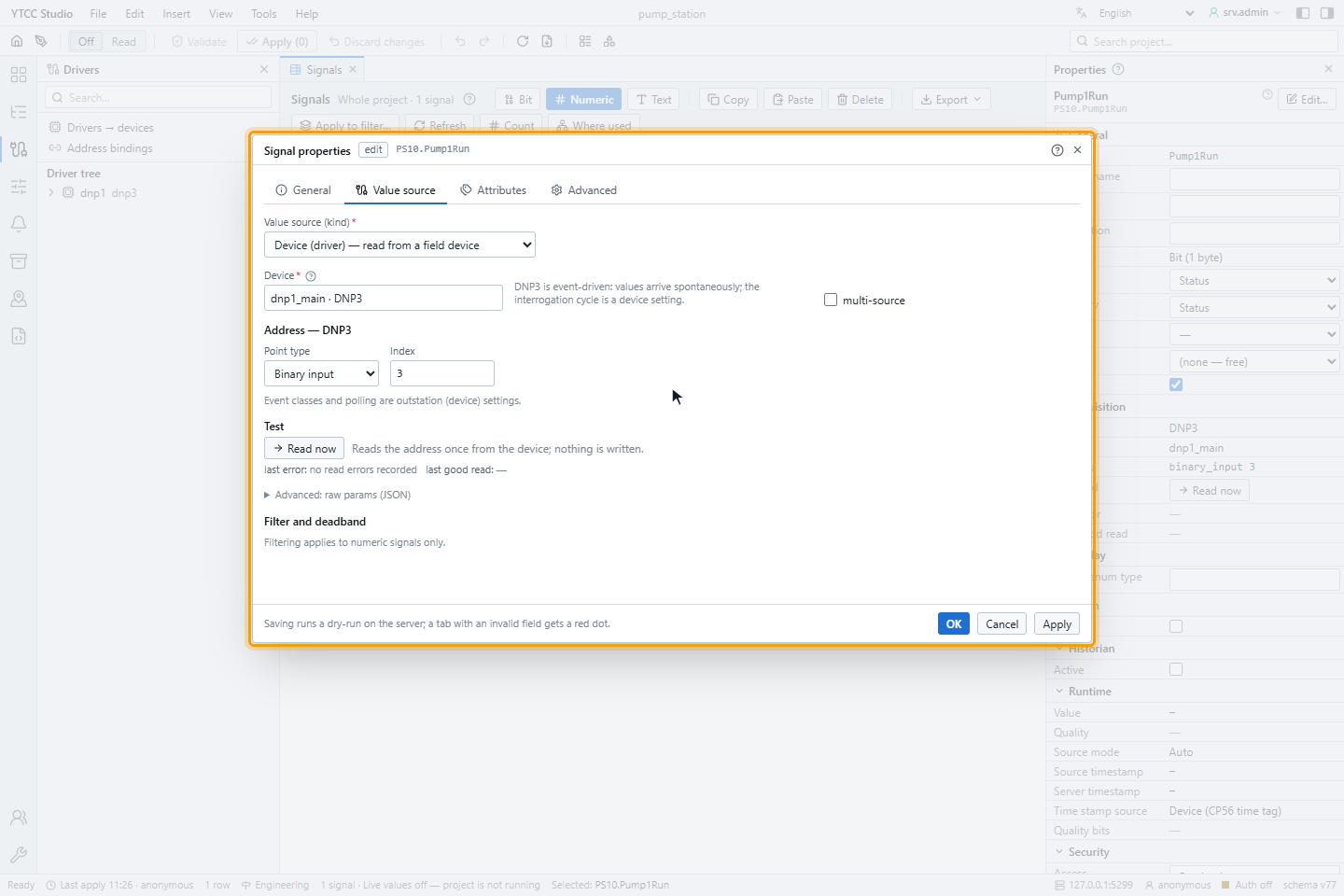
| Point type (form) | Name in import files | Objects |
|---|---|---|
| Binary input | binary_input | g1, g2 |
| Double-bit input | double_bit_input | g3, g4 |
| Binary output | binary_output | g10 status, g12 command |
| Counter | counter | g20, g22 |
| Analog input | analog_input | g30, g32 |
| Analog output | analog_output | g40 status, g41 command |
Frozen counters (frozen_counter), frozen analog inputs (frozen_analog_input), octet strings (octet_string), BCD
values (bcd) and the outstation's internal indications (iin, index 0–15) are set in the Address bindings table or created from a
device scan. The type names in import files are case-sensitive.
Event classes and polling are outstation settings. The outstation decides which variation it sends.
Reading
When the connection opens, the master disables unsolicited responses, synchronises the time (if switched on), runs an integrity poll and then enables unsolicited responses (if switched on). After that, it polls the event classes at their periods and receives unsolicited responses.
The master reacts to the outstation's internal indications:
| Indication | Reaction |
|---|---|
| Device restart | Clears it, synchronises the time, runs an integrity poll, enables unsolicited responses again |
| Time sync needed | Synchronises the time |
| Class 1/2/3 events | Polls those classes |
| Event buffer overflow | Runs an integrity poll; events may have been lost |
Events are confirmed only after YTCC has taken them, so they are not lost when YTCC is busy. Events without a time can be received twice after a reconnect.
Commands
A point can be commanded when its direction is out or inout; only binary outputs and analog outputs accept commands. The command settings are in the Address bindings table, columns Direction, Cmd mode, CROB and Ao variation; the Command tab of the signal has the general settings (write role, critical command, read-back).
| Setting | Values | Default |
|---|---|---|
| Cmd mode | select_operate (SELECT, then OPERATE), direct_operate, direct_operate_nr (no response) | select_operate |
| CROB | JSON: op latch_on / latch_off / pulse_on / pulse_off, tcc nul / close / trip, count, on_ms, off_ms | latch, count 1, on 1000 ms |
| Ao variation | 1 32-bit integer, 2 16-bit integer, 3 32-bit float, 4 64-bit float | 1 |
- Binary output (CROB, g12v1): the value is on or off. With
tccclose or trip, on gives CLOSE and off gives TRIP (with a pulse). With a latch template, on gives LATCH_ON and off LATCH_OFF; with a pulse template, PULSE_ON and PULSE_OFF. Example:{"op": "pulse_on", "tcc": "close", "on_ms": 500}. - Analog output (g41): the value is converted back through the signal's scale. A value that does not fit the chosen variation is rejected as out of range.
- With
select_operate, OPERATE is sent only if the SELECT answer matches and reports success. Commands are never repeated. - With
direct_operate_nr, and when OPERATE was sent but no answer came, the result is Command sent (no device confirmation). Set a read-back on the signal so that YTCC checks the real state. - If the outstation is in local control, the command is rejected with local control (LOCAL).
Before you command a point, set Direction and the command settings in the Address bindings table, and set Access of the signal to rw.
For how operators send and confirm commands, see Send commands.
Quality mapping
The first matching flag of the point decides the quality:
| DNP3 flag | Quality in YTCC |
|---|---|
| COMM_LOST | Bad · Not connected (reason: communication failure) |
| ONLINE not set | Bad |
| REMOTE_FORCED or LOCAL_FORCED | Good · Substituted, value origin manual in the field |
| RESTART | Uncertain |
| OVER_RANGE (analog) | Uncertain · EU exceeded |
| CHATTER_FILTER, DISCONTINUITY, REFERENCE_ERR | Uncertain |
| none of these | Good |
A float value of infinity is at least Uncertain · EU exceeded, NaN at least Bad. The intermediate and indeterminate states of a double-bit input are values, not a quality.
When the connection is lost, or several requests stay unanswered, the readable points are marked Bad · Not connected. They are refreshed by an integrity poll when the outstation answers again.
Time
| Event time | Time in YTCC |
|---|---|
| Time of a synchronised outstation | The outstation time; time source device |
| The outstation reports that it needs time, or sends an unsynchronised time base | The arrival time; device time invalid |
| Static value or event without time | The arrival time; protocol carries no time |
Time synchronisation (Time sync mode): lan measures with RECORD_CURRENT_TIME and writes the time, non_lan
measures the delay with DELAY_MEASURE first. Use time_offset_minutes for an outstation that keeps local time. With
on_need_time, YTCC synchronises whenever the outstation asks for it.
Security
- TLS: mutual TLS is always used and the outstation certificate is always verified.
verifyisserver_name(default),iporpinned(SHA-256 fingerprint of the outstation certificate). The certificate files are in the secrets folder of the driver. The status shows the certificate expiry date, in yellow undercert_expiry_warn_days. - Secure Authentication (SAv5): with
sa.enabled, commands and file operations are authenticated with one user number. Use a symmetric update key method andupdate_key_name. If the key files are missing, the outstation does not start and its commands are refused. Place the key files in the secrets folder and restart the driver. - Permission: the special outstation actions, file transfer and the virtual terminal need the profile permission DNP3 administration. Writing and deleting files needs configuration editing as well. Without the permission, only the status is shown. See Permissions.
Outstation management
In Drivers → devices, select the DNP3 driver and the outstation, and open Outstation management:
- Status (refreshed every 5 seconds): connection, Secure Authentication, TLS certificate, time synchronisation, the internal indications as chips (for example Device restart, Time sync needed, Local control, Event buffer overflow), frame counters, the last error and the device attributes.
- Actions (with the DNP3 administration permission): Integrity poll, Time sync now, Enable unsolicited, Disable unsolicited, Freeze, Freeze and clear, Warm restart, Cold restart. Actions that change the outstation ask for confirmation.
- Files: list, download, upload and delete files under the configured
root_prefixes. - Terminal: virtual terminal sessions on the configured ports.
Scan and device profile
Scan / Profile reads the device attributes and the events of the outstation; it sends no trial commands. The found points can be turned into signals after a dry-run preview. Upload device profile XML (up to 32 MB) reads the outstation's DNP3 Device Profile and compares it with what the scan found.
Diagnostics
Read now on the Value source tab reads the point once and shows the raw value, the value, the quality and the round-trip time.
The Communication diagnostics panel of the device (see Check the communication of a device) counts under Timeouts / retries the link-layer answers that did not arrive within Link timeout (ms), and the frames sent again after them.
Response time (avg / worst) in the same panel gives the average and the worst time in milliseconds of the integrity and event polls, from the moment the request was sent (the last send after a retry) to the first fragment of the answer. The values cover the time since the last connection, are reset when the outstation connects again, and keep their last values during a disconnection.
| Symptom | Likely cause |
|---|---|
| The outstation never answers | Wrong link address or master address; wrong transport, host or port; firewall |
| Values Uncertain after a restart | The outstation still reports RESTART; it clears after the start-up sequence |
| Event times are the arrival times | The outstation needs time: switch on Time sync |
| Chip Event buffer overflow | The outstation lost events; shorten the class poll periods or enable unsolicited responses |
| Command rejected with local control (LOCAL) | The outstation is switched to local operation |
| TLS connection fails | Certificate expired, name or fingerprint mismatch, wrong file names in TLS |
Conformance summary
The master implements the IEEE 1815-2012 level 4 master subset. The compliance matrix lists every request the master may issue and every response it shall parse as supported.
| Item | Supported |
|---|---|
| READ, WRITE, SELECT, OPERATE, DIRECT_OPERATE, DIRECT_OPERATE_NR | Yes |
| IMMED_FREEZE, FREEZE_CLEAR (with and without acknowledgement) | Yes |
| COLD_RESTART, WARM_RESTART, ENABLE / DISABLE_UNSOLICITED, ASSIGN_CLASS, DELAY_MEASURE, RECORD_CURRENT_TIME | Yes |
| File transfer (function codes 25–30) | Yes |
| Secure Authentication (function codes 32, 33) | Yes, symmetric |
| Objects g0, g1–g4, g10–g13, g20–g23, g30–g34, g40–g43, g50–g52, g60, g70, g80, g110–g113, g120–g122 | Yes |