IEC 60870-5-104
The IEC 60870-5-104 driver connects YTCC to RTUs, protection relays and gateways of substations and other telecontrol systems. For what all drivers have in common, see How drivers work.
Protocol and role
| Role | Controlling station (master), TCP client. YTCC connects to the RTUs; it does not accept IEC 104 connections. |
| Transport | IEC 60870-5-104 over TCP |
| Default port | 2404 |
| Devices per driver | Any number; each RTU has its own connection. |
| Frame sizes | Cause of transmission 2 bytes, common address 2 bytes, information object address 3 bytes |
| Driver type | IEC 104 (iec104) |
Device parameters
Set these on the device in Drivers → devices (see Add drivers and devices). An empty box uses the default shown in it.
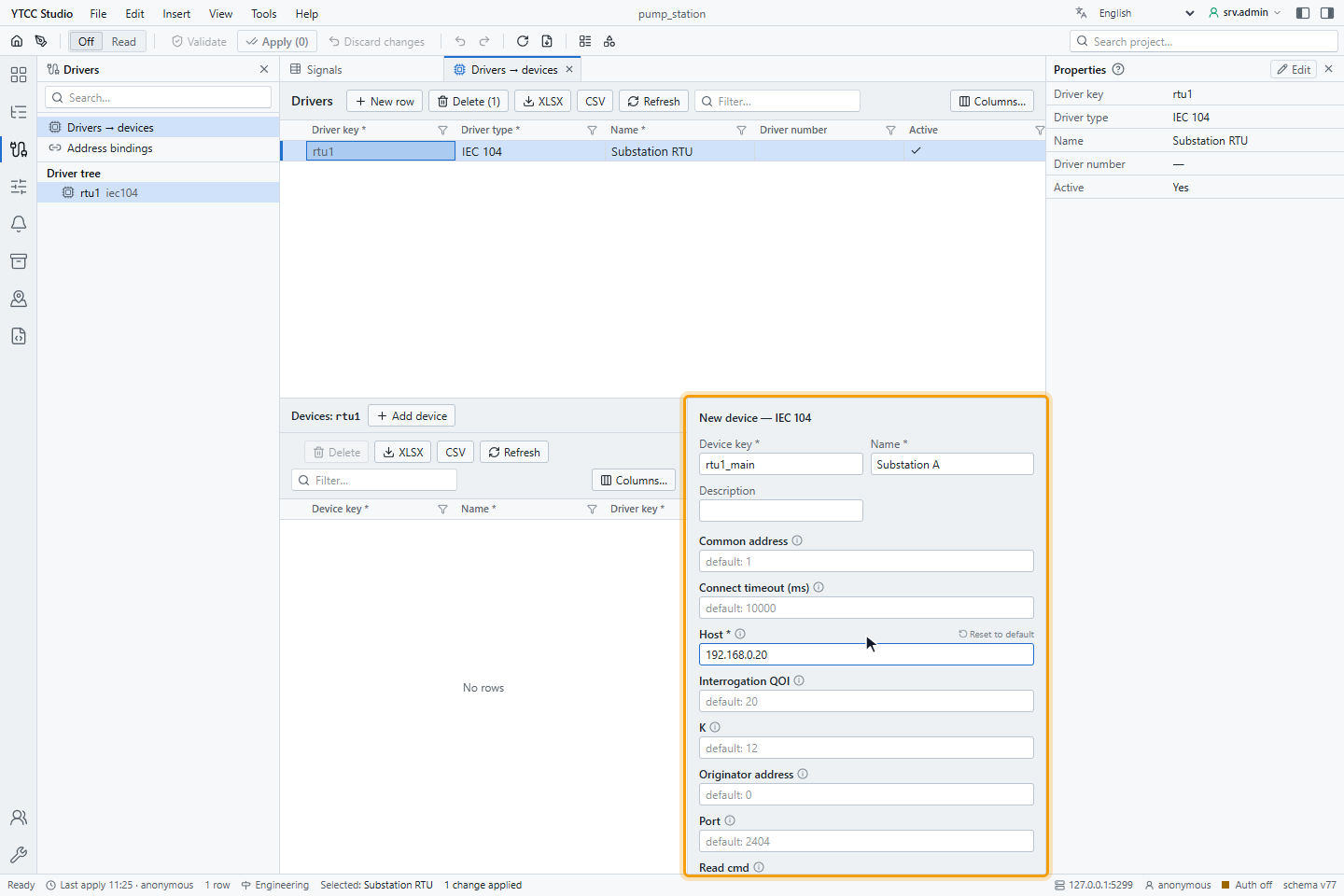
| Parameter | Default | Range | Meaning |
|---|---|---|---|
| Host | — (required) | IP address | Address of the RTU. |
| Port | 2404 | 1–65535 | TCP port of the RTU. |
| Common address | 1 | 0–65535 | Common address of the ASDU (station address). It must match the RTU, or no data arrives. |
| Originator address | 0 | 0–255 | Originator address in the cause of transmission. |
| Interrogation QOI | 20 | 20–36 | Qualifier of the interrogation: 20 station interrogation, 21–36 group 1–16. |
| Startup interrogation | on | on / off | Send a general interrogation each time the connection opens, so that every value is read again. Keep it on. |
| Set invalid on disconnect | on | on / off | When the connection is lost, mark all signals of the RTU as Bad · Not connected. |
| Connect timeout (ms) | 10000 | 0 and more | How long the driver waits when it opens the TCP connection. |
| K | 12 | — | Most I-frames sent without acknowledgement. |
| W | 8 | — | Most I-frames received before the driver acknowledges them. |
| Time offset minutes | 0 | −1440 to 1440 | Offset of the RTU clock from UTC, for time tags. For an RTU on Turkish local time, enter 180. |
| Read cmd | on | on / off | Ask the RTU for the current value of a signal that is added while the driver runs (read command). |
The protocol timers are t0 10 s, t1 15 s, t2 10 s, t3 20 s. The help mark next to each parameter shows a short description.
Changing any parameter except Read cmd reconnects that RTU; its signals are Bad · Not connected for that time. Adding, removing or changing signals takes effect without dropping the connection. A changed or new signal is asked for its value with a read command, or with an interrogation if the RTU does not answer.
Signal address
Set the address on the Value source tab of the signal, under Address — IEC 104: the IOA (information object
address), 0–16777215. In import files, write the number, optionally with IOA in front, for example 1001 or
IOA 1001 (see Import and export with Excel or CSV).
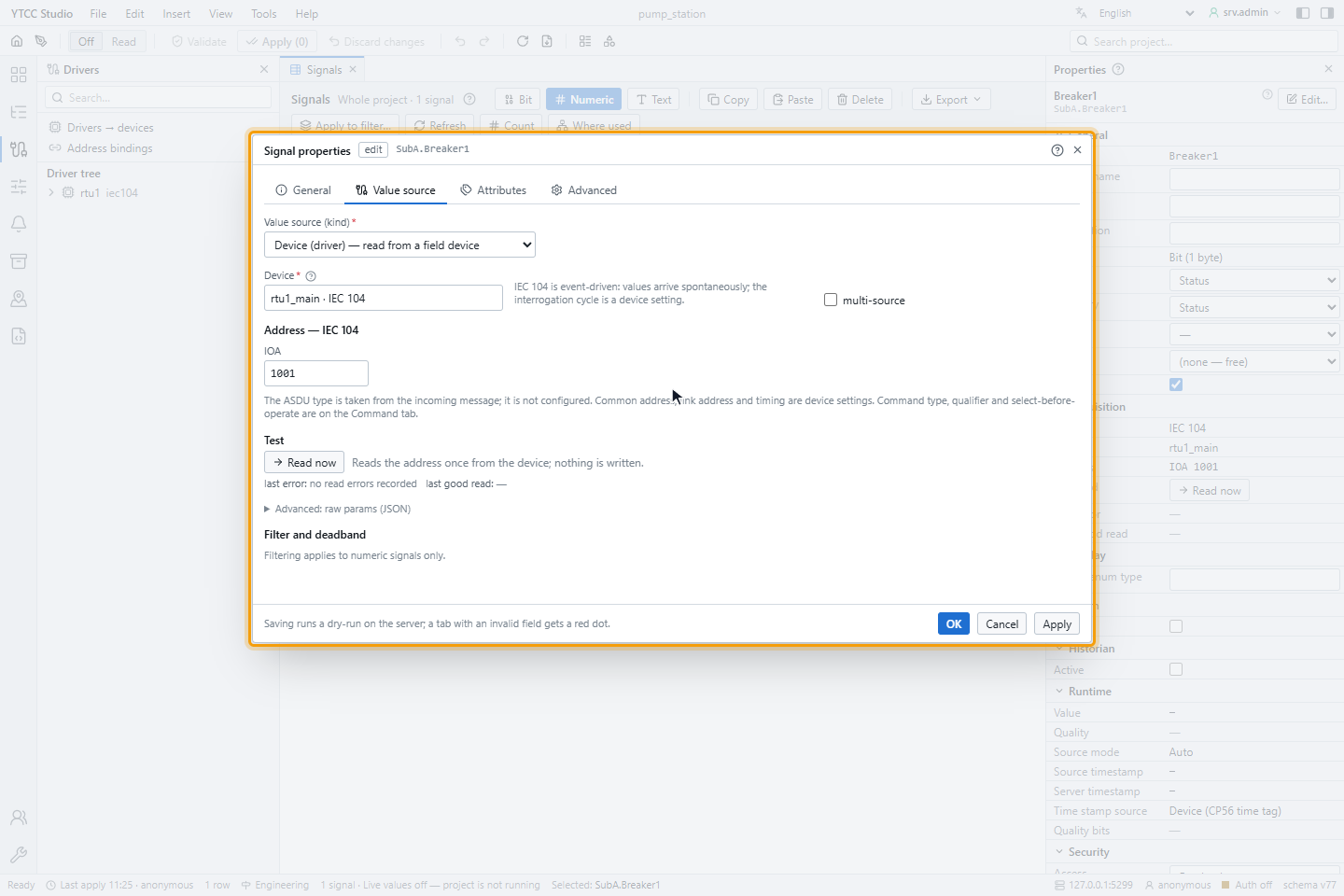
The monitoring type is not configured: YTCC takes it from the messages of the RTU. The same IOA can be used on several RTUs. The RTU sends changes by itself, so no scan class applies.
Monitoring types
| Type | Value in YTCC |
|---|---|
| Single point (M_SP_NA_1, M_SP_TB_1) | On or off |
| Double point (M_DP_NA_1, M_DP_TB_1) | 0 intermediate, 1 off, 2 on, 3 indeterminate |
| Measured value, normalised (M_ME_NA_1, M_ME_TD_1) | Number from −1 to +1 |
| Measured value, normalised without quality (M_ME_ND_1) | Number from −1 to +1, always Good |
| Measured value, scaled (M_ME_NB_1, M_ME_TE_1) | Integer |
| Measured value, floating point (M_ME_NC_1, M_ME_TF_1) | Floating-point number |
A scale and offset set on the signal are applied after reading.
Reading
When the connection opens, the driver starts data transfer and sends a general interrogation (if Startup interrogation is on). After that the RTU sends changes by itself (spontaneous transmission). Values with a time tag are all kept, also when several come at once; for values without a time tag the last one counts.
Commands
A signal can be commanded when its Access is Read / Write or Write only. Its settings are under IEC 60870-5 on the Command tab of the signal:
| Setting | Meaning |
|---|---|
| Command type | Single (C_SC) or Double (C_DC). |
| Qualifier (0 … 31) | The qualifier of the command (QU), sent as it is. |
| Select before operate | Send SELECT first and EXECUTE only after the RTU confirms the selection. |
| Wait for ACTTERM | Report the command as complete only after the activation termination of the RTU, not already after the confirmation. |
- A single command (C_SC_NA_1) takes on or off, or the number 1 (ON) or 0 (OFF). A double command (C_DC_NA_1) takes on or off, or the number 2 (ON) or 1 (OFF). A signal sends the command type set in Command type, and the driver rejects any other value.
- With Select before operate, the driver waits up to 10 seconds for the confirmation of the SELECT. If the RTU refuses or does not answer, EXECUTE is not sent. YTCC waits 25 seconds for the result of such a command, otherwise 10 seconds.
- Without Wait for ACTTERM, the command is reported as sent but not confirmed by the device.
- A refusal of the RTU is shown with the reason, for example a negative confirmation or unknown information object address (cause of transmission 47).
- If the RTU is not connected, the command is rejected at once. A second command to the same signal is rejected while the first one waits.
For how operators send and confirm commands, and critical commands with a second user, see Send commands.
Quality mapping
| Quality descriptor of the RTU | Quality in YTCC |
|---|---|
| IV (invalid) or BL (blocked) | Bad |
| SB (substituted) | Good · Substituted, value origin manual in the field |
| NT (not topical) | Uncertain · Stale (last usable) |
| OV (overflow) | Uncertain · EU exceeded |
| none | Good |
The signal details show the bits as IV, NT, SB, BL and OV. When the connection is lost, the signals are marked Bad · Not connected and keep their last value. When it comes back, the general interrogation refreshes them.
Time tags
Values with a CP56Time2a time tag carry the time of the event. YTCC converts it to UTC with Time offset minutes; set the offset to the RTU's offset from UTC.
| Time tag | Time source in the signal details |
|---|---|
| Valid | device; the event time is the RTU time |
| Invalid bit set, or impossible date | device time invalid; the arrival time is used |
| More than 5 minutes ahead or more than 7 days behind the arrival time | device time invalid; the arrival time is used |
| No time tag | protocol carries no time |
If many values show device time invalid, check Time offset minutes and the clock of the RTU.
Reconnecting
The driver opens the connection again after 1 second and doubles the wait up to 30 seconds, without a limit on the number of attempts. Each new connection starts data transfer and the general interrogation again.
Diagnostics
Read now on the Value source tab sends a read command for the IOA and waits 2 seconds:
| Text | Meaning |
|---|---|
| A type and value, for example M_ME_NC_1 23.5 | The RTU answered |
| Not connected — … ; IOA … was not read | The RTU is not connected |
| Timeout — no response from … within 2000 ms | The RTU did not answer the read command |
| RTU refused read command C_RD_NA_1 — … | The RTU does not support reading that address |
| Symptom | Likely cause |
|---|---|
| The RTU never connects | Wrong IP or port; firewall |
| Connected, but no values | Wrong Common address; Startup interrogation off; the IOAs do not exist in the RTU |
| One signal never changes | The IOA is not defined in the RTU, or the RTU sends it with a type that is not in Monitoring types |
| Many device time invalid | Wrong Time offset minutes, or the RTU clock is not synchronised |
| Command refused with "unknown information object address" | The command IOA does not exist in the RTU |
The communication alarm and the device status work as for every driver; see How drivers work.
Interoperability
Monitoring direction
| Type | Supported |
|---|---|
| M_SP_NA_1, M_SP_TB_1 single point | Yes |
| M_DP_NA_1, M_DP_TB_1 double point | Yes |
| M_ME_NA_1, M_ME_TD_1 measured value, normalised | Yes |
| M_ME_NB_1, M_ME_TE_1 measured value, scaled | Yes |
| M_ME_NC_1, M_ME_TF_1 measured value, floating point | Yes |
| M_ME_ND_1 measured value, normalised without quality | Yes |
Control direction
| Type | Supported |
|---|---|
| C_SC_NA_1 single command | Yes, with select before operate |
| C_DC_NA_1 double command | Yes, with select before operate |
System commands
| Command | Supported |
|---|---|
| C_IC_NA_1 interrogation (station and groups 1–16) | Yes |
| C_RD_NA_1 read | Yes |
Link layer
STARTDT and TESTFR are supported; the acknowledgement windows K and W can be set. Sequences of information objects (SQ = 1) are read.