IEC 60870-5-101 over TCP
The IEC 60870-5-101 driver connects YTCC to RTUs that speak IEC 101, through a TCP connection: a terminal server, a serial-to-Ethernet converter or an RTU with a TCP port. For what all drivers have in common, see How drivers work.
Protocol and role
| Role | Controlling station (master). YTCC connects to the RTUs and polls them. |
| Transport | IEC 101 frames (FT 1.2) over TCP, unbalanced transmission |
| Port | No default; enter the port of the terminal server or the RTU |
| Devices per driver | Any number of RTUs, one RTU per host and port |
| Driver type | IEC 101 (iec101) |
Device parameters
Set these on the device in Drivers → devices (see Add drivers and devices). An empty box uses the default shown in it. The help mark next to each parameter shows a short description.
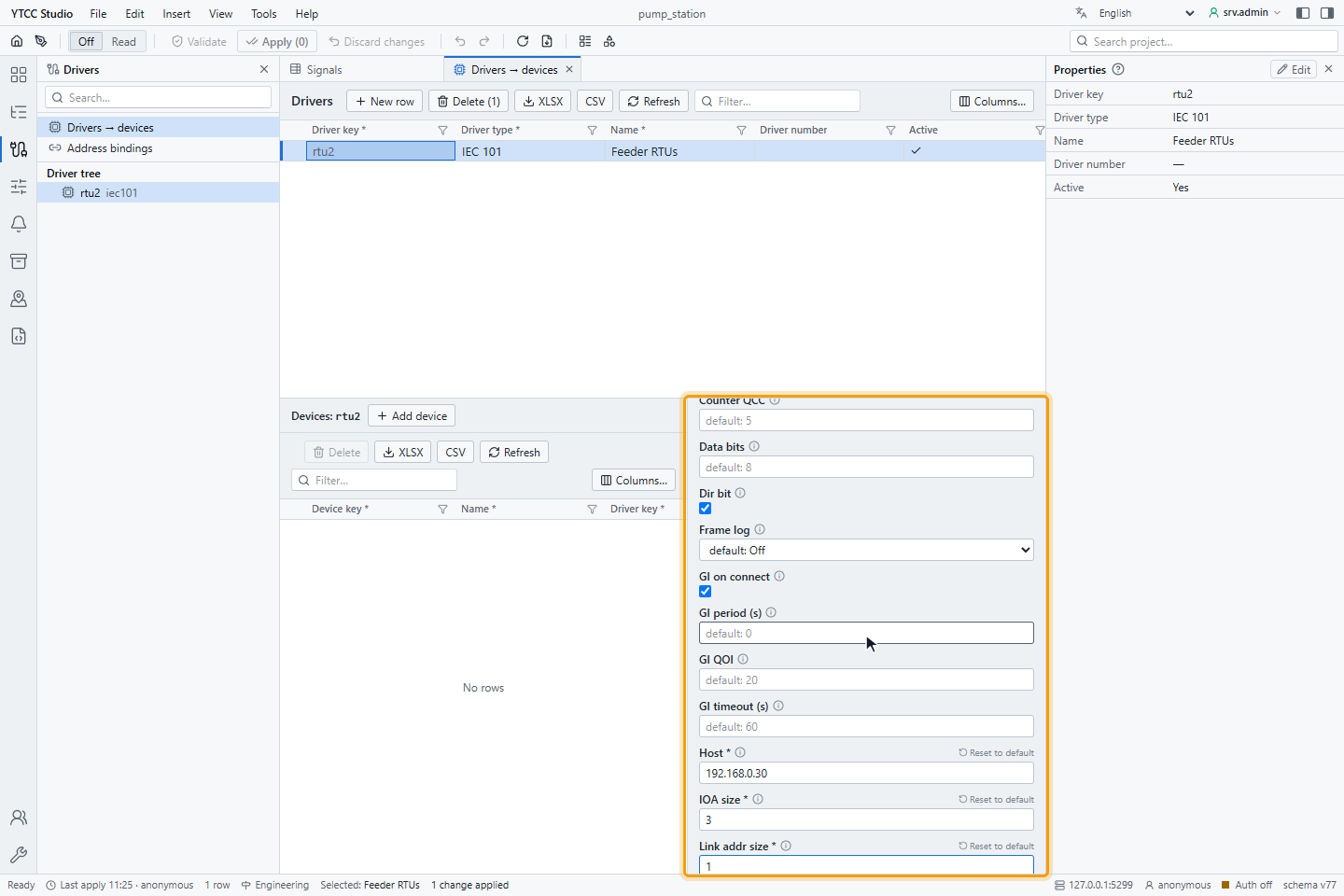
Connection and link
| Parameter | Default | Range | Meaning |
|---|---|---|---|
| Transport | — (required) | TCP | Use TCP. |
| Host | — (required) | IP address or host name | Address of the terminal server or the RTU. |
| Port | — (required) | 1–65535 | TCP port. |
| Serial path, Baud rate, Parity, Data bits, Stop bits | —, 9600, Even, 8, 1 | — | For a serial transport; not used with TCP. |
| Connect timeout (ms) | 5000 | 0 and more | How long the driver waits when it opens the TCP connection. |
| Reconnect max (ms) | 5000 | 500–600000 | Longest wait between two connection attempts; see Reconnecting. |
| Link mode | Unbalanced | Unbalanced | Use Unbalanced. |
| Link address | — (required) | must fit Link addr size | Link address of the RTU. |
| Link addr size | — (required) | 1 or 2 bytes | Size of the link address. |
| Response timeout (ms) | 1000 | 50 and more | How long the driver waits for each answer of the RTU. |
| Max retries | 3 | 0–10 | How often a frame is sent again before the link counts as lost. |
| Poll interval (ms) | 250 | 10 and more | Pause between class 2 polls when the RTU has no data. |
| Use link status request | on | on / off | Ask for the link status before resetting the link. |
| Dir bit, Link test interval (ms), Send single char ack | on, 10000, off | — | For the balanced link mode; not used with Unbalanced. |
Application layer
| Parameter | Default | Range | Meaning |
|---|---|---|---|
| COT size | — (required) | 1 or 2 bytes | Size of the cause of transmission. |
| CA size | — (required) | 1 or 2 bytes | Size of the common address. |
| IOA size | — (required) | 1, 2 or 3 bytes | Size of the information object address. |
| Common address | the link address | must fit CA size | Common address of the ASDU. |
| Originator address | 0 | 0–255 | Originator address; sent only with a 2-byte COT. |
The sizes have no default: take them from the RTU's interoperability list.
Interrogation, counters and clock
| Parameter | Default | Meaning |
|---|---|---|
| GI on connect | on | Send a general interrogation each time the link comes up. Keep it on. |
| GI QOI | 20 | Qualifier of the interrogation: 20 station, 21–36 group 1–16. |
| GI period (s) | 0 | Repeat the general interrogation at this interval; 0 is off. |
| GI timeout (s) | 60 | How long the driver waits for the end of an interrogation (also of a counter interrogation). |
| Counter interrogation period (s) | 0 | Send a counter interrogation at this interval; 0 is off. |
| Counter QCC | 5 | Qualifier of the counter interrogation. |
| Clock sync on connect | on | Set the RTU clock each time the link comes up. |
| Clock sync period (s) | 3600 | Repeat the clock synchronisation at this interval; 0 is off. |
| Clock sync mode | Sequential | Sequential, Once per host or Parallel: how RTUs behind the same host are synchronised. |
| Time offset minutes | 0 | Offset of the RTU clock from UTC. For an RTU on Turkish local time, enter 180. |
Commands and other
| Parameter | Default | Meaning |
|---|---|---|
| Cmd timeout (ms) | 10000 | How long the driver waits for the confirmation of each command step. |
| Cmd wait termination | off | Count a command as complete only after the activation termination, for all signals of the RTU. |
| Set invalid on disconnect | on | When the link is lost, mark all signals of the RTU as Bad · Not connected. When off, nothing changes on screen. |
| Read cmd | on | Ask for the current value of a signal that is added while the driver runs. |
| Frame log | Off | Off, Asdu or All: write the frames to the driver log, for troubleshooting. |
Changing any device parameter except Read cmd reconnects that RTU. Adding, removing or changing signals takes effect without dropping the link and without a new interrogation.
Signal address
Set the address on the Value source tab of the signal, under Address — IEC 101: the IOA, 0–16777215, and it
must fit IOA size. In import files, write the number, optionally with IOA in front (see
Import and export with Excel or CSV).
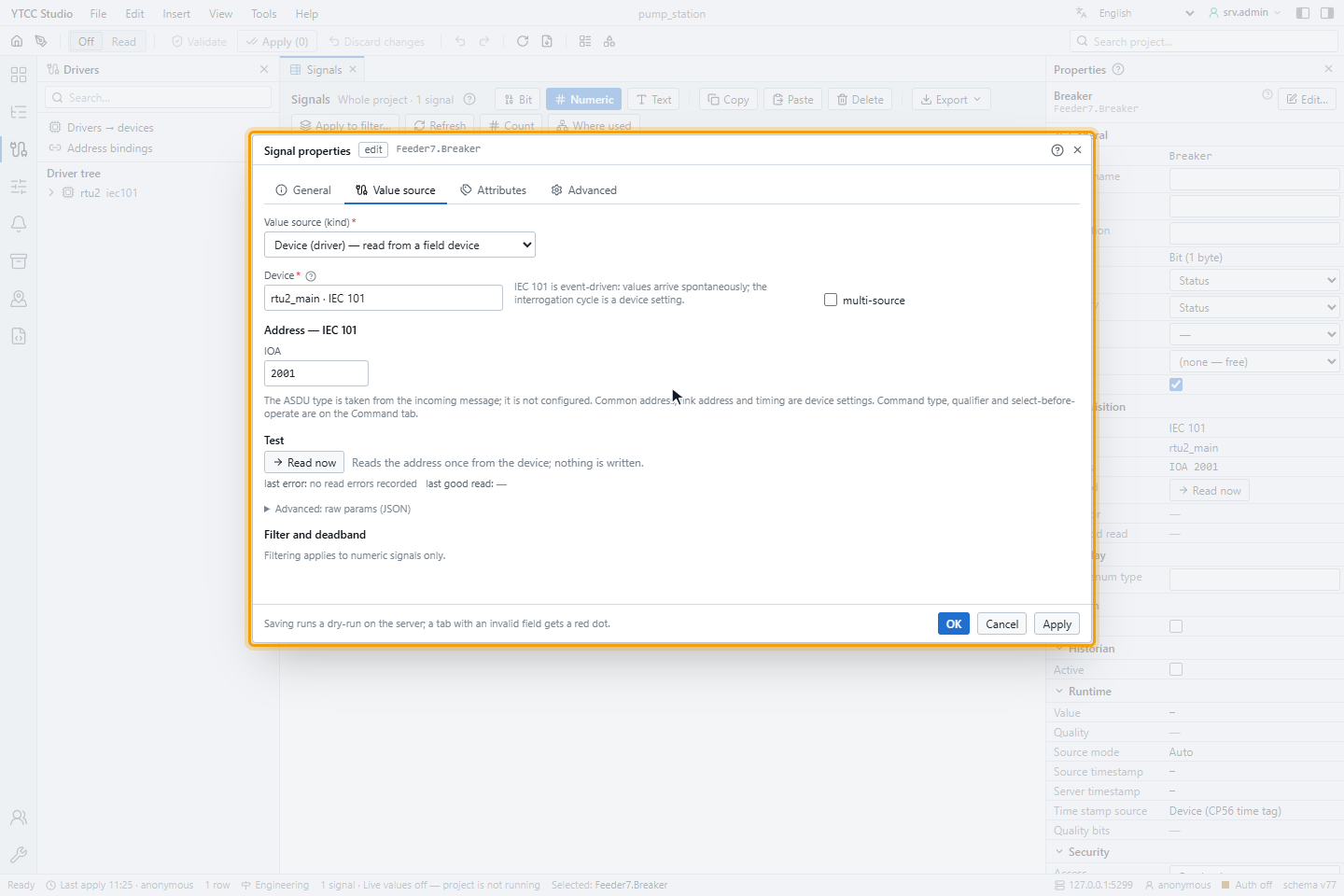
The monitoring type is not configured: YTCC takes it from the messages of the RTU. A monitored point and a command point can use the same IOA; incoming data goes to the monitored point.
Monitoring types
| Type | Without time | With CP24 time | With CP56 time | Value in YTCC |
|---|---|---|---|---|
| Single point | 1 M_SP_NA | 2 M_SP_TA | 30 M_SP_TB | On or off |
| Double point | 3 M_DP_NA | 4 M_DP_TA | 31 M_DP_TB | 0 intermediate, 1 off, 2 on, 3 indeterminate |
| Step position | 5 M_ST_NA | 6 M_ST_TA | 32 M_ST_TB | Integer; Uncertain while in transition |
| Bitstring of 32 bits | 7 M_BO_NA | 8 M_BO_TA | 33 M_BO_TB | Unsigned number |
| Measured value, normalised | 9 M_ME_NA (21 without quality) | 10 M_ME_TA | 34 M_ME_TD | −1 to +1 |
| Measured value, scaled | 11 M_ME_NB | 12 M_ME_TB | 35 M_ME_TE | Integer |
| Measured value, short float | 13 M_ME_NC | 14 M_ME_TC | 36 M_ME_TF | Floating-point number |
| Integrated totals | 15 M_IT_NA | 16 M_IT_TA | 37 M_IT_TB | Integer; Bad when the counter is invalid |
Reading
The driver polls the RTU: class 1 data whenever the RTU reports it has some, otherwise class 2 data, with Poll interval (ms) between empty answers. When the link comes up, it synchronises the clock and sends a general interrogation (if switched on). When the RTU reports a restart (end of initialisation), the start-up sequence runs again.
Commands
A signal can be commanded when its Access is Read / Write or Write only. Its settings are under IEC 60870-5 on the Command tab of the signal:
| Setting | Meaning |
|---|---|
| Command type | Single (C_SC), Double (C_DC), Regulating step (C_RC), Setpoint normalized (C_SE_NA), Setpoint scaled (C_SE_NB) or Setpoint float (C_SE_NC). |
| Qualifier (0 … 31) | The qualifier of the command (QU), sent as it is. |
| Select before operate | Send SELECT first and EXECUTE only after the RTU confirms the selection. |
| Wait for ACTTERM | Report the command as complete only after the activation termination of the RTU. |
- For a double command and a regulating step, the value 1 is OFF or LOWER and 2 is ON or HIGHER.
- Each step waits up to Cmd timeout (ms) for the confirmation. A negative confirmation, or causes 44–47, rejects the command with the reason.
- A command must reach the RTU within 2 seconds of being sent. With select before operate, the EXECUTE step also has to go out within these 2 seconds, otherwise the command ends as expired.
- The RTU accepts one command at a time; a second command is rejected as Previous command in progress. If the link is down, the command is rejected at once.
For how operators send and confirm commands, see Send commands.
Quality mapping
| Quality descriptor of the RTU | Quality in YTCC |
|---|---|
| IV (invalid) or BL (blocked) | Bad |
| SB (substituted) | Good · Substituted, value origin manual in the field |
| NT (not topical) | Uncertain · Stale (last usable) |
| OV (overflow) | Uncertain · EU exceeded |
| none | Good |
When the link is lost, the signals are marked Bad · Not connected and keep their last value; after the link comes back, the general interrogation refreshes them. With Set invalid on disconnect off, the signals keep Good with an old value; keep it on.
Time tags
| Time tag | Time in YTCC |
|---|---|
| CP56Time2a, valid | The RTU time; time source device |
| CP24Time2a (minutes and milliseconds) | Date and hour are taken from the arrival time |
| Invalid bit set, impossible date, more than 5 minutes ahead or 7 days behind | Arrival time; device time invalid |
| No time tag | Arrival time; protocol carries no time |
YTCC converts RTU times to UTC with Time offset minutes. The clock synchronisation sends UTC plus the same offset.
Reconnecting
After the link is lost, the driver opens it again after 100 ms and doubles the wait (0.1, 0.2, 0.4, 0.8, 1.6, 3.2 s …) up to Reconnect max (ms), 5 seconds by default. After a cable is plugged back in, the RTU is connected again within about 10 seconds with the defaults.
Diagnostics
Read now on the Value source tab sends a read command for the IOA and waits 2 seconds:
| Text | Meaning |
|---|---|
| A type and value | The RTU answered |
| Not connected — … ; IOA … was not read | The link to the RTU is down |
| Timeout — no response from … within 2000 ms | The RTU did not answer the read command |
| RTU refused read command C_RD_NA_1 — unknown information object address (COT 47) … | The IOA does not exist in the RTU |
| Link failed before the answer — … | The link dropped during the read |
| Symptom | Likely cause |
|---|---|
| The RTU does not start | Transport is not TCP, Link mode is not Unbalanced, missing sizes, or a second RTU on the same host and port |
| Connected, but no values | Wrong Link address, Common address or sizes; GI on connect off |
| Values arrive slowly | Poll interval (ms) or Response timeout (ms) too long; a slow line behind the terminal server |
| Times wrong by hours | Wrong Time offset minutes |
| Command expired with select before operate | The RTU confirms SELECT too slowly for the 2-second limit |
Set Frame log to Asdu or All to see the frames in the driver log; set it back to Off afterwards.
Interoperability
Monitoring direction
| Type | Supported |
|---|---|
| 1, 3, 5, 7, 9, 11, 13, 15, 21 without time tag | Yes |
| 2, 4, 6, 8, 10, 12, 14, 16 with CP24 time tag | Yes |
| 30–37 with CP56 time tag | Yes |
| 70 end of initialisation | Yes (start-up sequence repeats) |
Control direction
| Type | Supported |
|---|---|
| 45 C_SC, 46 C_DC, 47 C_RC, 48 C_SE_NA, 49 C_SE_NB, 50 C_SE_NC | Yes, with select before operate |
System commands
| Command | Supported |
|---|---|
| 100 C_IC general interrogation (station and groups) | Yes |
| 101 C_CI counter interrogation (periodic) | Yes |
| 102 C_RD read | Yes |
| 103 C_CS clock synchronisation | Yes |
Link layer
| Function | Supported |
|---|---|
| Unbalanced transmission | Yes |
| Reset of remote link, request status of link | Yes |
| Request user data class 1 and class 2, ACD and DFC | Yes |
| Single character E5 as acknowledgement | Received |