Set up commands
A signal with write access can receive commands from operators and scripts. The Command tab of the signal decides who may send them, whether a reason or a second person is needed, and how YTCC checks that the command took effect. For how operators send commands, see Send commands.
Before you begin
- The signal window is open and the signal has the access Read / Write or Write only; only then the Command tab is shown.
Steps
1. Set who may send and how
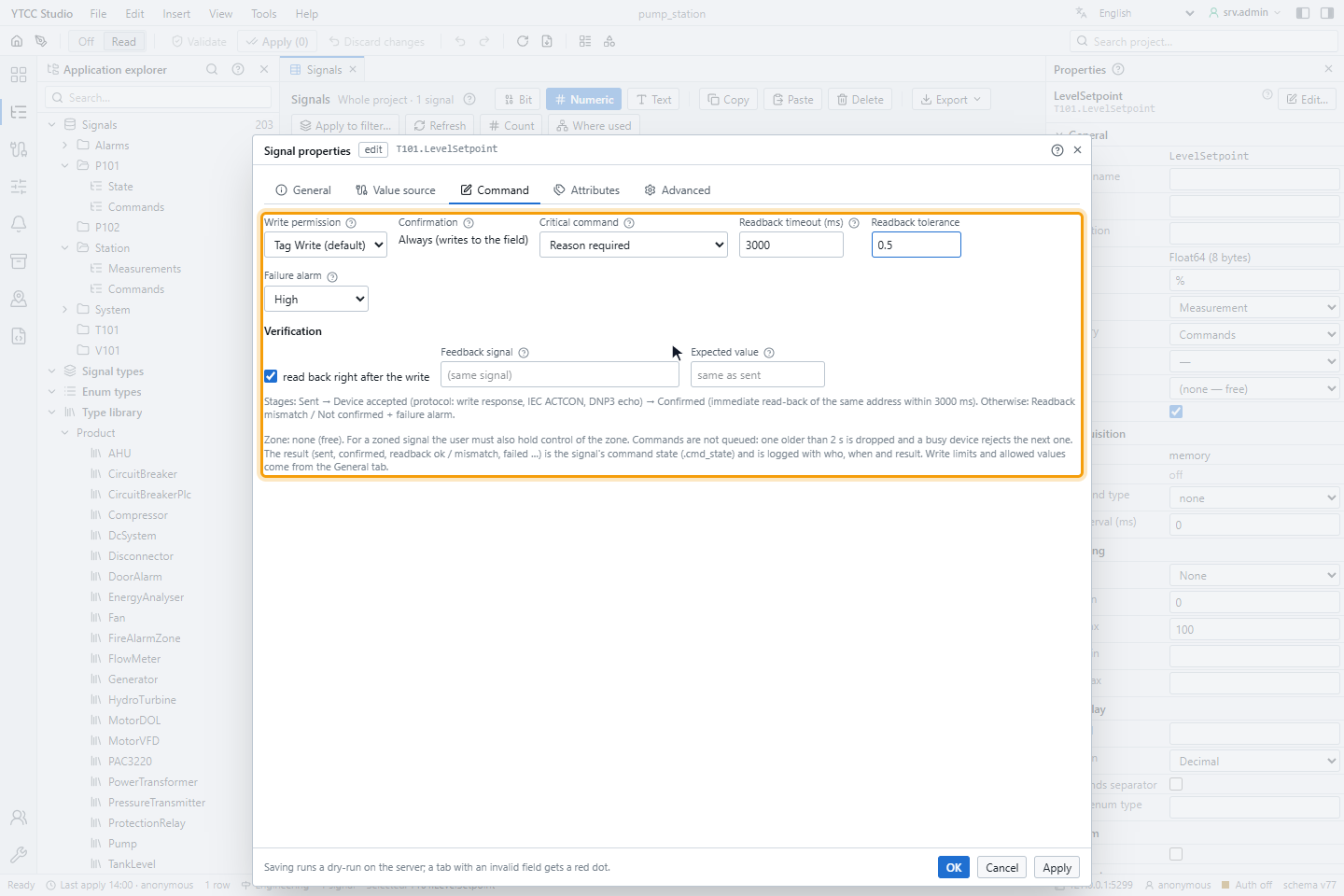
Open the Command tab and set:
| Setting | Options | Meaning |
|---|---|---|
| Write permission | Tag Write (default) or a profile | Who may send commands, in addition to the Tag Write permission |
| Confirmation | Always (writes to the field) | Every command to the field asks the operator for confirmation; this cannot be switched off per signal. Only a Write Tag action on a button of a command popup can leave out the window; see Action types |
| Critical command | No, Reason required, Reason + second-user approval | A reason, and optionally the approval of a second user with Approve commands (four eyes), is required before sending |
| Readback timeout (ms) | 100 to 600 000, empty = no readback | How long YTCC waits for the value to arrive back |
| Readback tolerance | A number | How far the value read back may differ from the value sent |
| Failure alarm | Off (log only), Low, Medium, High, Critical | The priority of the alarm raised when a command fails |
2. Check the verification
The Verification section sets how a command is confirmed:
- read back right after the write: YTCC reads the address again after writing (on by default for read/write signals; not possible for write-only signals).
- Feedback signal: another signal that shows the result, for example the running status for a start command; by default the signal itself.
- Expected value: the value expected back for each value sent, written as
sent→expected, for example1→1, 0→0; by default the value sent.
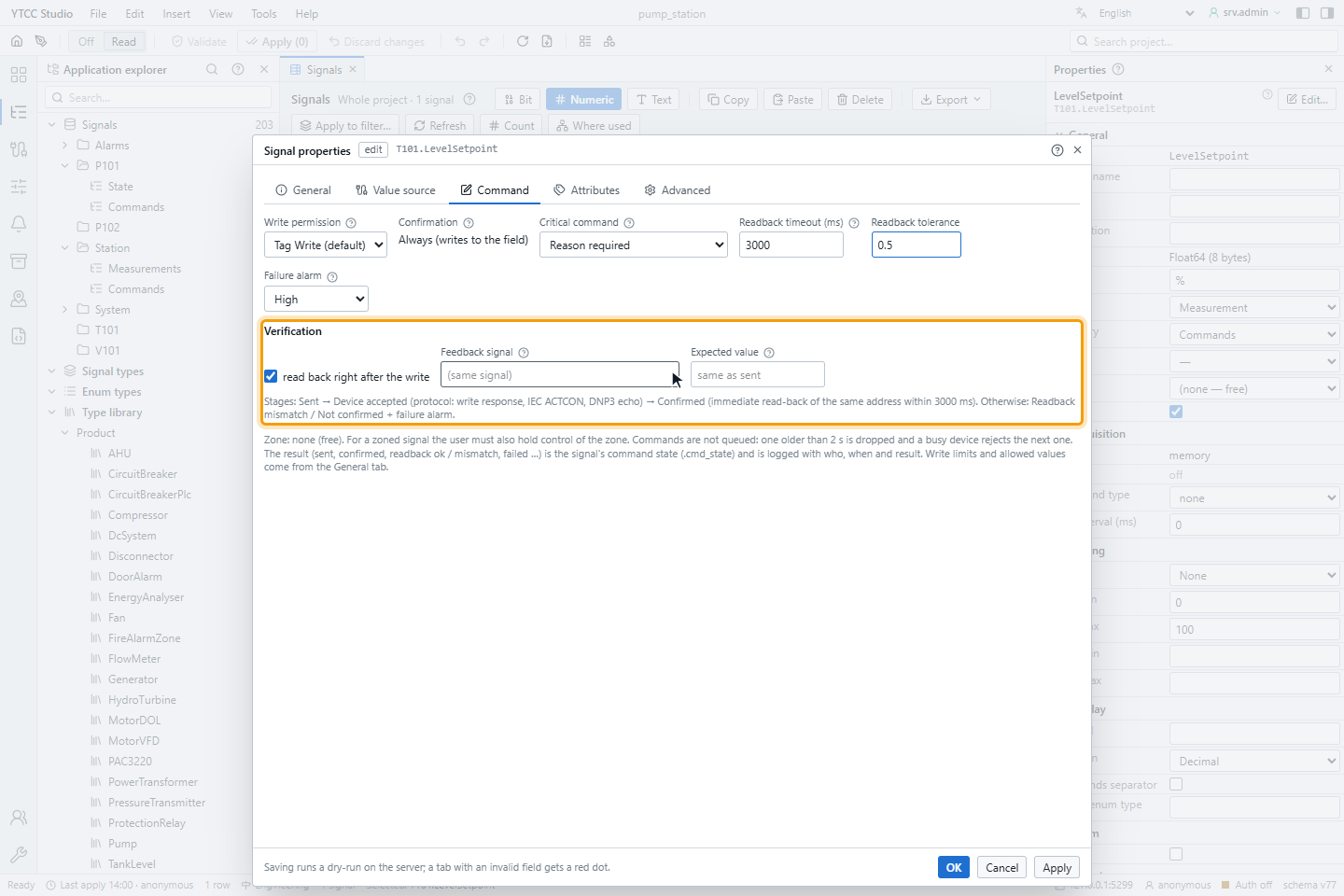
The note below shows the stages for the current settings, for example Stages: Sent → Device accepted (protocol: write response, IEC ACTCON, DNP3 echo) → Confirmed (immediate read-back of the same address within 3000 ms). Otherwise: Readback mismatch / Not confirmed + failure alarm. Without a readback timeout the command stops at Device accepted.
Click OK and apply the configuration; see Validate and apply.
IEC 60870-5 signals
For signals of an IEC 104 or IEC 101 driver the tab has an IEC 60870-5 section:
| Setting | Options |
|---|---|
| Command type | single (C_SC, default), double (C_DC), regulating step (C_RC), setpoint normalized (C_SE_NA), setpoint scaled (C_SE_NB), setpoint float (C_SE_NC) |
| Qualifier (0 … 31) | 0 by default |
| select before operate | The device is first selected, then the command executed; a refused selection stops the command |
| wait for ACTTERM | The command counts as done only when the device reports termination |
How a command ends
Every command gets a result that operators see and that is logged with who, when and the result: sent, device accepted, confirmed, read-back mismatch, rejected or timed out. A rejected, timed-out or mismatching command raises a Command failed alarm with the chosen priority; it must be acknowledged and cannot be shelved.
- Commands are not queued: a command older than 2 seconds is dropped, and a second command to the same signal is refused while the first one is in progress.
- Some protocols cannot confirm a command, for example IEC 104 and MQTT; the command then stays sent, unacknowledged unless a readback confirms it.
- Write limits and allowed values are set on the General tab; see Process signal values.
- A signal of type Enum accepts only the whole numbers of its enum type. Any other value is rejected before it reaches the driver, with Value out of range and the allowed values in the message; range and clamping do not apply. An example is an enum type with 1 = OFF and 2 = ON for a double command.
- For a signal in a responsibility zone the user must also control the zone.