EtherNet/IP (Logix)
The EtherNet/IP driver reads and writes tags of Allen-Bradley ControlLogix and CompactLogix PLCs by their names, with CIP explicit messaging. For what all drivers have in common, see How drivers work.
Protocol and role
| Role | Client. YTCC connects to the PLCs and reads tags by name. |
| Transport | EtherNet/IP explicit messaging over TCP (unconnected) |
| Default port | 44818 |
| Devices per driver | Any number; each PLC has its own session. |
| PLCs | ControlLogix and CompactLogix (Logix tags). |
| Driver type | EtherNet/IP (ethernetip) |
Device parameters
Set these on the device in Drivers → devices (see Add drivers and devices). An empty box uses the default shown in it. The help mark next to each parameter shows a short description.
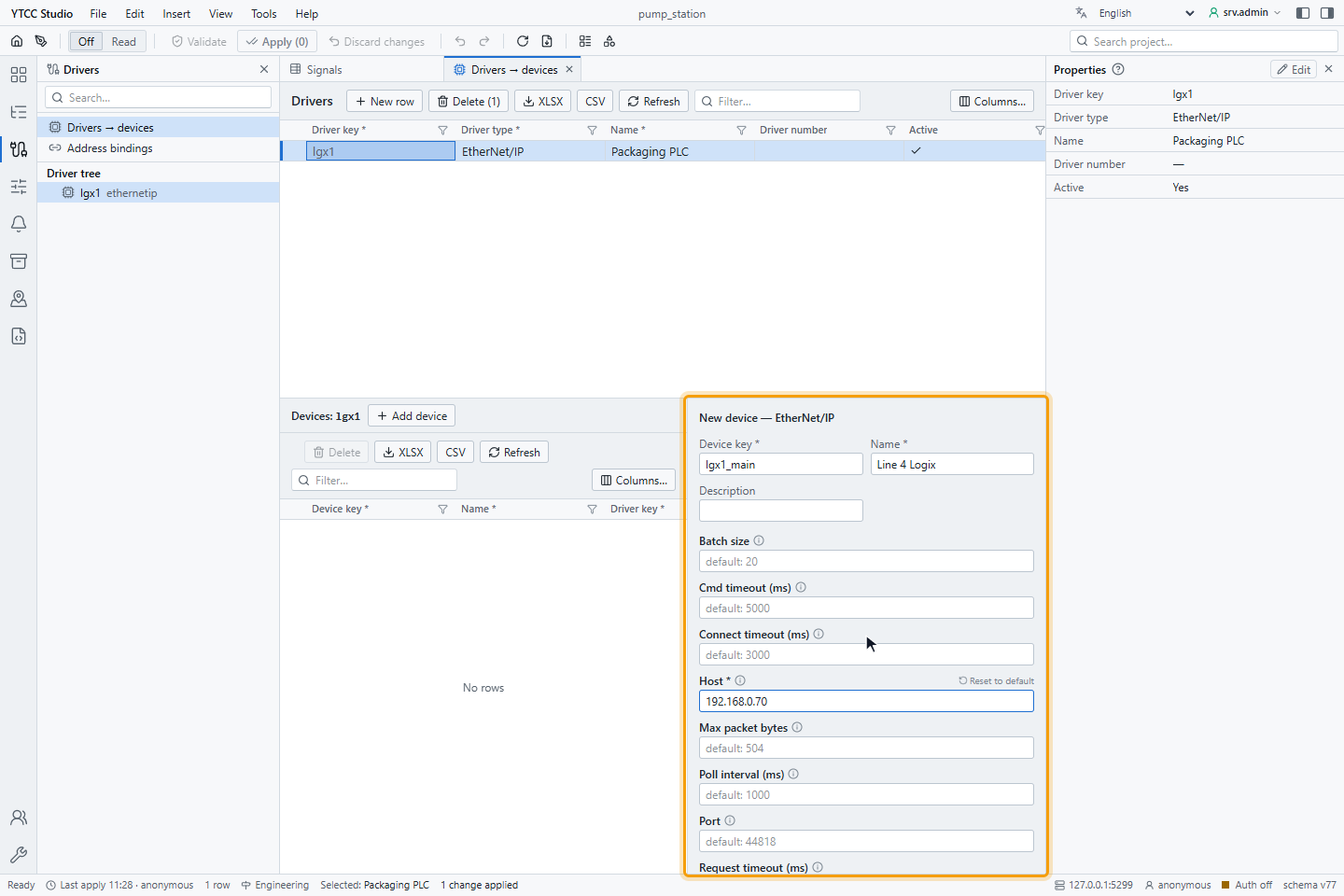
| Parameter | Default | Range | Meaning |
|---|---|---|---|
| Host | — (required) | IP address or host name | Address of the CompactLogix, or of the Ethernet module in a ControlLogix rack. |
| Port | 44818 | 1–65535 | EtherNet/IP port. |
| Slot | empty | 0–17 | Slot of the CPU in a ControlLogix rack. Leave empty for a CompactLogix. |
| Connect timeout (ms) | 3000 | 100–60000 | How long the driver waits when it connects. |
| Request timeout (ms) | 5000 | 100–60000 | How long one request may take; a longer wait counts as a lost connection. |
| Poll interval (ms) | 1000 | 10–3600000 | Read period for signals without their own scan class. |
| Batch size | 20 | 1–200 | Most tags read in one request. |
| Max packet bytes | 504 | 504–4000 | Largest request; 504 works on every Logix PLC. |
| Cmd timeout (ms) | 5000 | 100–600000 | How long a command may wait before it is rejected as expired. |
| Set invalid on disconnect | on | on / off | When the connection is lost, mark all signals of the PLC as Bad · Not connected. |
Changing Host, Port, Slot, Batch size or Max packet bytes reconnects that PLC; the other parameters take effect without dropping the connection.
Signal address
Set the address on the Value source tab of the signal, under Address — EtherNet/IP: the Tag path and the Data type. The tag path is the tag name as in the PLC program, without spaces:
| Tag path | Meaning |
|---|---|
Motor1_Speed | Controller tag |
Program:MainProgram.Counter | Program tag |
Recipe[3] | Array element |
Line.Motor[2].Speed | Member of a user-defined type |
StatusWord.5 | Bit 5 of an integer tag; the data type must be BOOL |
In import files, write the tag path in the address column.
Data types
| Data type | Value in YTCC |
|---|---|
| BOOL | On or off |
| SINT, INT | Int16 |
| DINT | Int32 |
| LINT | Int64 |
| USINT, UINT | UInt16 |
| UDINT | UInt32 |
| ULINT | UInt64 |
| REAL | Float32 |
| LREAL | Float64 |
| STRING (standard, 82 characters) | Text |
The data type must match the type of the tag in the PLC: if the PLC returns another type, the signal is Bad. For STRING, set
"data_type": "string" in Advanced: raw params (JSON). To read a user-defined type, bind each member as its own
signal.
Reading
The driver groups the signals of a PLC by read period and reads them in batches of up to Batch size tags, as long as the answer fits Max packet bytes. Signals with the same tag path are read once. If a batch is refused, for example because one tag does not exist, the driver reads its tags one by one; a tag that still fails is retried on its own every 30 seconds, so it does not slow down the others.
Values are published when they change.
Writing
A signal can be written when its Access is Read / Write or Write only. The value is converted to the Data type: integers are checked against their range, a fraction for an integer type is rejected, a BOOL takes 0 or 1. Scaled values are converted back before writing.
- Write to a separate BOOL tag. A signal on a bit of an integer (
StatusWord.5) or on an element of a BOOL array (Flags[3]) stays read-only. - A command waiting longer than Cmd timeout (ms), or sent while the PLC is not connected, is rejected.
- Writes are never repeated. If the connection breaks during a write, the result is No response from device and the PLC may or may not have taken the value; set a read-back on the signal.
For how operators send and confirm commands, see Send commands.
Quality
| Situation | Quality |
|---|---|
| The tag was read and has the right type | Good |
| The tag does not exist, access is refused or the type differs | Bad; the last value stays |
| The connection is lost | Bad · Not connected (with Set invalid on disconnect); the last value stays |
The time of a value is the time it was read; the PLC sends no time stamp.
Reconnecting
After the connection is lost, the driver tries again after 100 ms and doubles the wait up to 20 seconds. Commands during that time are rejected at once.
Diagnostics
Read now on the Value source tab reads the tag once through the PLC's session:
| Text | Meaning |
|---|---|
| A value and the PLC type | The PLC answered |
| Tag path is missing | No tag path |
| Bit address '…' needs data_type bool | A bit address with another data type |
| No connection to … | The PLC is not connected |
| Timeout — no response from … within … ms | The PLC did not answer |
| CIP error — … (tag …, device …) | The PLC refused the read, for example because the tag does not exist |
| Decode error — Type mismatch — the point is Dint, the PLC returned REAL | Data type does not match the tag |
| Symptom | Likely cause |
|---|---|
| The PLC does not connect | Wrong host; for ControlLogix, wrong Slot or the IP of the CPU instead of the Ethernet module |
| One signal Bad | Tag name misspelled, tag not in the controller or program scope, wrong Data type |
| All values slow | Max packet bytes larger than the PLC accepts: batches are refused and tags are read one by one |
| Signal on a custom string type or a whole user-defined type is Bad | The tag is not of a type in Data types; use a standard STRING or bind the members as their own signals |
Supported services
| Service | Supported |
|---|---|
| Register session, unconnected send with route | Yes |
| Read tag | Yes |
| Write tag | Yes |
| Multiple service packet (batched reads) | Yes |